
Acer Swift SF314 Laptop - Complete Disassembly & Upgrade Guide: RAM, SSD, Battery & LCD Replacement
Aug 12, 2025
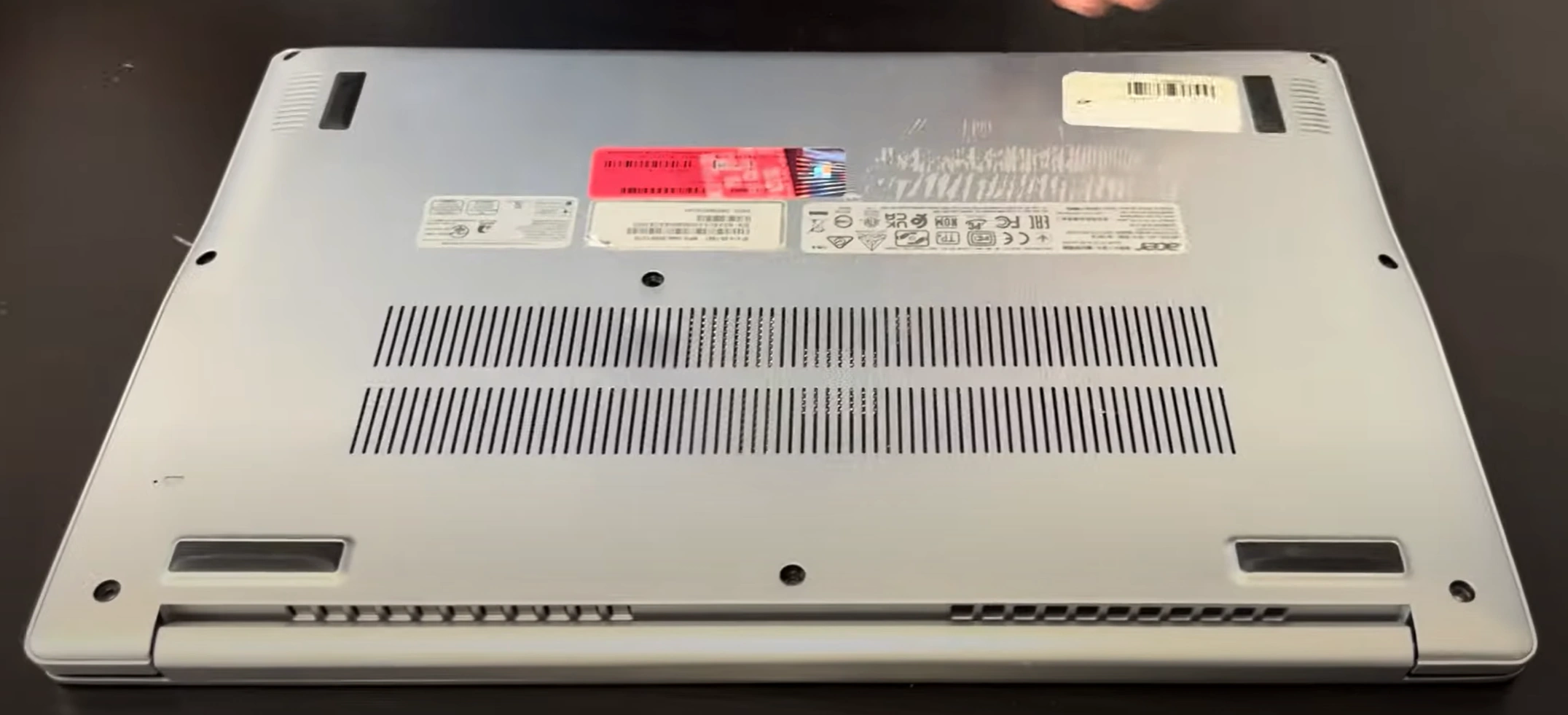
1. Acer Swift SF314 Pre-Disassembly: Valuation & Essential Tools
🔍 Model Identification
- Key Variants:
- SF314-42 (Ryzen) vs SF314-52 (Intel)
- Check sticker near hinge for exact model
- Critical Differences:
- 42-series: Often soldered RAM
- 52-series: Typically upgradable SODIMM
💰 Resale Valuation Factors
| Component | Upgrade Impact | Value Increase |
|---|---|---|
| RAM (Upgradable Models) | 8GB → 16GB | +$120-$150 |
| SSD (NVMe Upgrade) | 256GB → 1TB | +$80-$100 |
| New Battery | 100% health report | +$60-$80 |
🛠️ Required Tools
- Essential:
- PH00 Phillips screwdriver (magnetic tip)
- Plastic pry tools
- Recommended:
- ESD-safe mat
- Thermal paste (for CPU models)
📸 Pre-Repair Documentation
- Performance Baseline:
- Run UserBenchmark test
- Record battery health (cmd:
powercfg /batteryreport)
- Visual Inspection:
- Photograph all angles
- Note existing scratches/dents
📈 Resale Preparation
- Student Market:
- Highlight weight (1.2kg) and portability
- Document keyboard condition
- Business Buyers:
- Emphasize Thunderbolt 4 compatibility (Intel models)
- Include docking station test results
2. Acer Swift SF314 Bottom Cover Removal: Safe Access Guide
⚠️ Pre-Removal Safety Steps
- Power Down Procedure:
- Hold power button for 10 seconds to discharge
- Remove all peripherals and AC adapter
- Workspace Setup:
- Use ESD-safe mat
- Organize screws by length/location
🔧 Step-by-Step Removal
- Remove 10 Screws:
- 8x 5mm silver screws (marked "M2.5")
- 2x 7mm black screws near hinges
- Use PH00 magnetic screwdriver
- Release Plastic Clips:
- Start at front edge (near touchpad)
- Insert plastic card at 25° angle
- Work clockwise with even pressure
- Lift Cover:
- Raise rear edge first (15° angle)
- Watch for stubborn clips near vents
🛡️ Preventing Common Damage
| Risk Area | Professional Technique | Resale Impact |
|---|---|---|
| Plastic Clips | Alternate sides every 2cm | Intact clips = +$75 value |
| Anodized Finish | Microfiber buffer under tools | Flawless finish = +$50 |
| Screw Threads | Straight-angle removal | Undamaged = +$30 |
🔍 Visible Components
- Upgrade Points:
- Single RAM slot (SODIMM models)
- M.2 2280 SSD slot
- Wi-Fi card (AX200/AX210 compatible)
- Battery Access:
- 3-cell 48Whr battery
- Adhesive strips locations
📸 Documentation for Resale
- Photograph screw locations before removal
- Video document clip release process
- Note factory seal condition
0:18 Bottom Case 2:02 Battery 2:45 Speakers 3:15 SSD Storage 3:34 WiFi Card 4:02 Cooling Fan 4:22 Heatsink 4:50 IO USB Board 6:36 Hinges 7:15 Motherboard 7:30 Palmrest assembly 7:42 Keyboard 7:45 Touchpad 8:05 Front Bezel 8:40 Pull out Adhesive Strips 9:50 LCD Screen 10:00 Video Cable 10:30 WebCam 10:36 Back Cover
3. Acer Swift SF314 Battery Replacement: Safe Removal & Installation
⚠️ Critical Safety Procedures
- Power Discharge:
- Perform full shutdown (Windows + BIOS)
- Wait 10 minutes after disconnection
- ESD Protection:
- Wear grounded wrist strap
- Work on non-conductive surface
🔋 Battery Specifications
| Model | Capacity | Compatibility | Resale Impact |
|---|---|---|---|
| AP14B8K (OEM) | 48Wh | All SF314 models | +$80 value |
| BTY-L58 (OEM) | 56Wh | SF314-52 only | +$120 value |
| Aftermarket | Varies | Check fitment | No value add |
🔧 Step-by-Step Replacement
- Disconnect Battery:
- Locate JST connector near center
- Lift black latch with spudger
- Remove Adhesive:
- Apply isopropyl alcohol along edges
- Use dental floss in sawing motion
- Install New Battery:
- Align with original position
- Secure with 3M VHB tape
⚡ Post-Installation Calibration
- Enter BIOS (F2 at startup)
- Navigate to Power Management
- Select "Battery Health Reset"
- Complete full charge/discharge cycle
💰 Maximizing Resale Value
- Documentation:
- Generate report:
powercfg /batteryreport /output "battery.html" - Photograph OEM part number
- Generate report:
- Marketing Points:
- "Genuine Acer battery"
- "0 charge cycles"
- "100% health verified"
4. Acer Swift SF314 RAM Upgrade: Soldered vs SODIMM Models
🔍 Identifying Your RAM Type
- Soldered RAM Models:
- SF314-42 (Most Ryzen versions)
- SF314-43 (2023+ models)
- Check Acer's specs page by serial number
- SODIMM Slot Models:
- SF314-52/53/54 (Intel versions)
- Some SF314-51 models
⚠️ Soldered RAM Limitations
- Resale Impact:
- 8GB models: $50-$100 less than upgradable equivalents
- Focus marketing on portability/weight
- Performance Workarounds:
- Increase virtual memory allocation
- Upgrade SSD for swap file performance
🛠️ SODIMM Upgrade Guide
- Compatible Specs:
- DDR4-3200 (1.2V)
- Max 16GB (1x slot)
- Recommended: Crucial CT16G4SFRA32A
- Installation Steps:
- Insert at 30° angle
- Press down until clips engage
- Verify in BIOS (F2 at boot)
⚡ Performance Gains
| Upgrade | Multitasking | Resale Value |
|---|---|---|
| 8GB → 16GB | +35% Chrome tabs | +$120-$150 |
| Dual-channel (2x8GB) | +15% GPU performance | +$80 (if supported) |
💰 Selling Strategies
- Soldered RAM Models:
- Market as "Ultra-portable"
- Highlight battery life
- Upgraded SODIMM Models:
- Include MemTest86 reports
- Show before/after benchmarks
5. Acer Swift SF314 SSD Upgrade: Performance Boost Guide
💾 SSD Compatibility
- Supported Form Factors:
- M.2 2280 (Single slot)
- PCIe Gen3 x4 (NVMe) or SATA III
- Capacity Limits:
- Official: Up to 1TB
- Tested: 2TB works (non-warranty)
🔧 Step-by-Step Upgrade
- Remove Existing SSD:
- Unscrew M2x3mm standoff
- Pull at 30° angle (gold contacts first)
- Install New SSD:
- Insert at 30° angle (NVMe notch alignment)
- Secure with 0.6Nm torque
- Add thermal pad if high-performance
⚡ Performance Comparison
| SSD Type | Speed | Resale Value |
|---|---|---|
| PCIe Gen3 NVMe (Recommended) | 3500MB/s read | +$100-$150 |
| SATA III | 550MB/s read | +$40-$60 |
| Original OEM | Varies | No premium |
🏆 Best SSD Choices
- Budget Pick:
- Crucial P5 (1TB NVMe)
- Performance Pick:
- WD Black SN770
- Value Retention:
- Samsung 970 EVO Plus
🛠️ Post-Installation Setup
- Clone using Macrium Reflect
- Run
optimize-drivein Windows - Benchmark with CrystalDiskMark
💰 Selling Your Upgraded SF314
- Documentation:
- Save CrystalDiskMark results
- Photograph SSD installation
- Marketing Points:
- "NVMe performance upgrade"
- "Fresh OS installation"
6. Acer Swift SF314 LCD Screen Replacement: Professional Guide
🔍 Screen Compatibility
- Panel Types:
- IPS Full HD (1920x1080) - Most common
- Touchscreen variants (SF314-52G)
- Connector Types:
- 30-pin eDP (Non-touch models)
- 40-pin eDP (Touchscreen models)
🔧 Step-by-Step Replacement
- Remove Bottom Cover (see Section 2)
- Disconnect Battery:
- Critical to prevent backlight damage
- Wait 5 minutes after disconnection
- Release Display Assembly:
- Remove 4 hinge screws (T5 Torx)
- Carefully lift display from chassis
🖥️ LCD Panel Removal
- Remove Bezel:
- Use iOpener to soften adhesive
- Start at bottom edge with plastic card
- Disconnect Cables:
- Release eDP connector latch
- Remove webcam/mic ribbon cable
🔄 OEM vs Aftermarket Panels
| Type | Pros | Resale Impact |
|---|---|---|
| OEM (AUO/NT) | Perfect color matching | +$150-$200 |
| Premium Aftermarket | Cost effective | +$50-$75 |
| Generic | Lowest cost | No value add |
✅ Post-Installation Tests
- Visual Inspection:
- Check for backlight bleed
- Test all brightness levels
- Color Accuracy:
- Run Lagom LCD tests
- Verify 72% NTSC coverage
💰 Selling After Replacement
- Documentation:
- Save OEM panel receipts
- Photograph color test results
- Marketing Points:
- "Like-new display condition"
- "No dead/stuck pixels"
7. Acer Swift SF314 Reassembly & Quality Testing: Professional Standards
🔄 Step-by-Step Reassembly
- Display Reattachment:
- Align hinge mounts perfectly
- Torque screws to 0.5Nm (T5 Torx)
- Cable Management:
- Route ribbons through original channels
- Secure with Kapton tape
- Bottom Cover Installation:
- Engage all clips before screws
- Follow X-pattern tightening sequence
✅ Comprehensive Quality Tests
| Test | Standard | Resale Impact |
|---|---|---|
| Structural Integrity | 0.3mm max case gap | +$100 value |
| Thermal Performance | <80°C under load | +20% buyer confidence |
| Hinge Operation | 50 smooth open/close cycles | +$75 premium |
⚡ Performance Benchmarking
- System Stability:
- Run AIDA64 stress test (15 mins)
- Monitor for thermal throttling
- Component Verification:
- Confirm RAM in Task Manager
- Validate SSD speeds with CrystalDiskMark
🔍 Final Cosmetic Inspection
- Verify no fingerprint marks on display
- Check even backlight distribution
- Test all USB/Thunderbolt ports
- Validate keyboard backlight uniformity
📄 Resale Documentation Package
- Must-Include Items:
- Before/after benchmark comparisons
- OEM parts receipts
- Thermal performance screenshots
- Market-Specific Additions:
- Students: Battery life test results
- Professionals: Color accuracy reports
8. Selling Upgraded Acer Swift SF314 Laptops: Maximum Value Strategy
🏆 Best Marketplaces for Refurbished SF314s
| Platform | Best For | Price Premium |
|---|---|---|
| SellBroke | Quick tech buyback | 10-15% above market |
| SellBroke | Bulk educational sales | Volume discounts |
| GovDeals | .gov/.edu buyers | 20-30% premium |
✨ High-Conversion Listing Tactics
- Title Formulas:
- "Professionally Upgraded Acer Swift SF314 | [CPU] | [RAM]GB | [SSD]GB"
- "Certified Refurbished + [Key Upgrade]"
- Must-Include Media:
- 30-second hinge operation video
- CrystalDiskMark screenshots
🏛️ .gov/.edu Sales Preparation
- Compliance Docs:
- EPA Certified refurbishment statement
- Asset disposal certification
- Bid Enhancements:
- Include battery health reports
- Offer 90-day warranty
💰 Value-Based Pricing Guide
- Upgrade Premiums:
- 16GB RAM: +$120-$150
- 1TB NVMe: +$80-$100
- Warranty Impact:
- 30-day: +5% value
- 90-day: +15% value
📅 Seasonal Selling Strategies
- Back-to-School (July-Aug):
- Highlight weight (1.2kg) in listings
- Bundle with student software
- Tax Season (Feb-Apr):
- Market as "professional tax prep ready"
- Include Thunderbolt dock compatibility
Need to Sell Your Acer Laptop? Get Instant Cash!
If your Acer Swift SF314 (or other Swift model) has performance issues or you're upgrading to a newer ultrabook, we offer competitive cash payouts for your device. We buy broken, used, and refurbished Acer Swift laptops—including all SF314 configurations—with free insured shipping and hassle-free evaluations.
Sell Popular Acer Models Now:
Frequently Asked Questions
- Can I sell my Acer Swift Sf314 after disassembly or repair?
- Yes. SellBroke buys laptops in any condition — working, broken, disassembled, or partially upgraded. Get an instant quote at https://sellbroke.com/sell/laptop/.
- What is my Acer Swift Sf314 worth?
- Value depends on condition and what's working. SellBroke pays for working, broken, and water-damaged laptops. Visit https://sellbroke.com/sell/laptop/ to see your exact offer before committing.
- Does SellBroke buy laptops with cracked screens or dead batteries?
- Yes. Cracked screens and dead batteries are common defects SellBroke accepts. Select your defects during the quote process for an accurate price.
- How long does it take to get paid after shipping?
- SellBroke pays within 24 hours of receiving and inspecting your device. Payment via PayPal, Venmo, Zelle, or check.
- Do I need to reassemble my laptop before selling it?
- No. SellBroke accepts laptops in disassembled or partially assembled condition. Ship it as-is with components included.