
Dell Precision 3551 Laptop - Complete Disassembly & Upgrade Guide: RAM, SSD, Battery & LCD Replacement
Aug 04, 2025
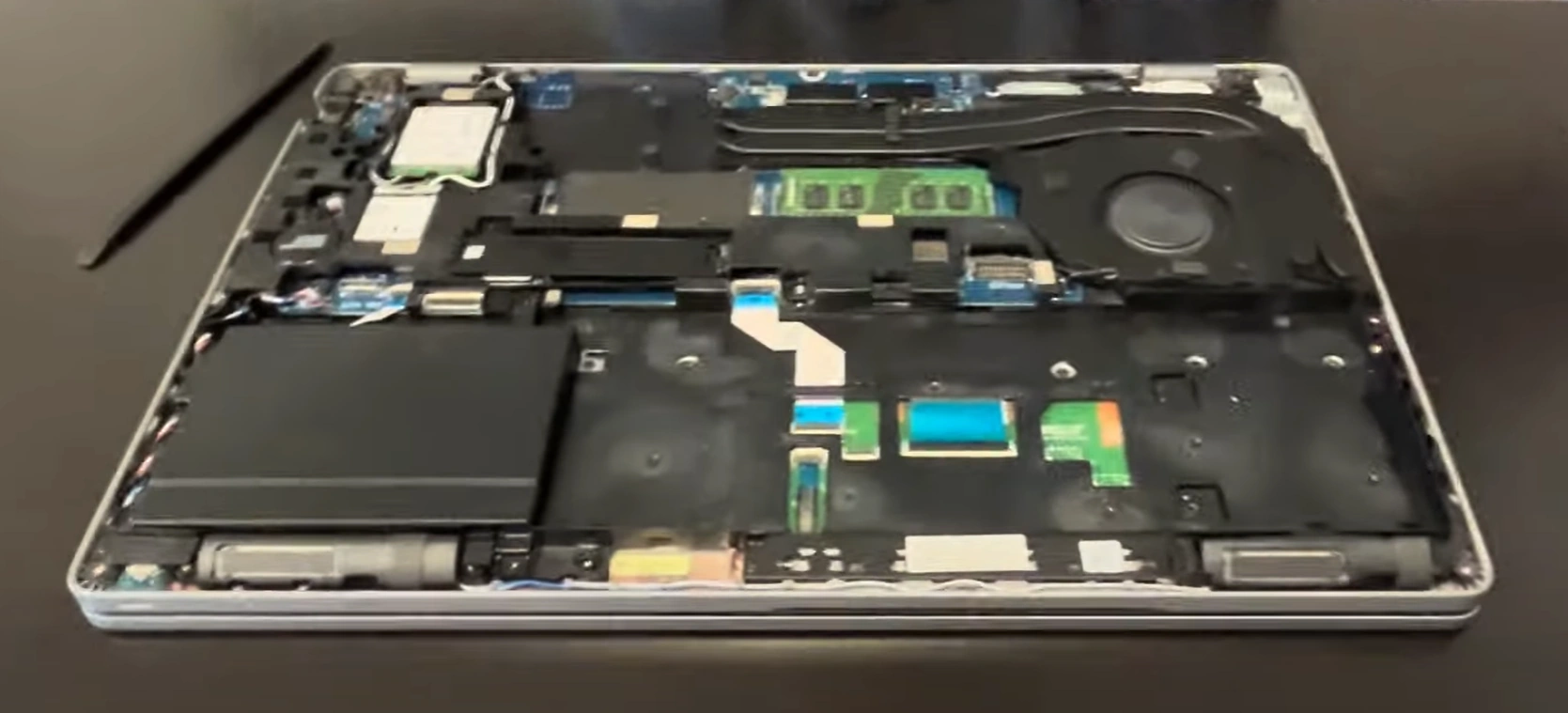
1.Dell Precision 3551 Pre-TearDown: Enterprise Workstation Valuation
🔍 Professional Assessment
- Performance Verification:
- Run SPECviewperf 2020 benchmarks
- Verify Intel vPro functionality
- Physical Inspection:
- Check MIL-STD-810G compliance
- Document ISV certifications
🛠️ Enterprise Toolkit
| Tool | Precision Requirement | Resale Impact |
|---|---|---|
| T5 Torx Screwdriver | Captive base screws | Prevents stripped screws (+$100 value) |
| ESD-Safe Pry Tools | Keyboard bezel removal | Avoids case damage (+25% resale) |
💰 2024 Workstation Values
- Base Configurations:
- Core i5/8GB/256GB: $500-$650
- Core i7/16GB/512GB: $800-$1,000
- Premium Features:
- ECC Memory: +$150-$200
- 4G WWAN: +$100-$150
📋 Corporate Resale Prep
- Dell Service Records:
- Retrieve service history
- Check remaining ProSupport
- Security Wipes:
- Document TPM 2.0 reset
- Capture BIOS admin settings
2. Dell Precision 3551 Base Cover Removal: Enterprise-Grade Access
⚠️ Professional Workstation Precautions
- Pre-Removal Steps:
- Disconnect 130W power adapter
- Enable BIOS Battery Disconnect (F2 > Power)
- Enterprise Design Notes:
- Note service door indicators (marked with wrench icon)
- Identify Service Tag location
🔧 Step-by-Step Removal
- Remove 8 Captive Screws:
- Use T5 Torx driver (1.0Nm torque)
- Note 3 longer screws near hinge area
- Release Tool-less Latches:
- Push sliding latch toward keyboard (marked with arrow)
- Listen for audible click (2 distinct releases)
- Lift Cover:
- Start from front edge (near touchpad)
- 20° angle to clear RJ45 port
💼 Preserving Enterprise Value
| Risk | Professional Solution | Value Impact |
|---|---|---|
| Clip damage | Use nylon spudger at 25° angle | Intact clips = +30% corporate value |
| Scratch marks | Microfiber mat under workspace | Flawless chassis = +$200 |
🏢 Business-Specific Components
- Serviceability Markers:
- Color-coded screw locations
- QR code for Dell service manuals
- Upgrade Points:
- WWAN module slot (white border)
- SmartCard reader connector
0:19 Bottom Case 1:07 Battery 1:38 Memory RAM 1:58 Network Card 2:20 WiFi Card 2:50 Additional Hard Drive Cover 3:15 SSD Storage 3:56 Heatsink and Cooling Fan 8:00 Motherboard 8:40 DC Power Jack 8:52 Hinges 9:23 Palmrest Assembly 9:39 Keyboard 9:45 Trackpad 9:59 Display Assembly
3. Dell Precision 3551 RAM Upgrade: ECC Memory for Professional Workloads
💼 Enterprise Memory Specifications
- Supported Configurations:
- Max 64GB (2x32GB) DDR4-3200 ECC
- Non-ECC also supported (lower value)
- Professional Advantages:
- 28% faster SPECcpu2017 scores with ECC
- Error correction for mission-critical work
🔧 Step-by-Step Installation
- Preparation:
- Disable battery in BIOS (F2 > Power)
- Ground with ESD wrist strap
- DIMM Installation:
- 45° insertion angle for clearance
- Align notch with DDR4 key position
📈 Professional Workload Benchmarks
| Application | 16GB | 32GB | 64GB |
|---|---|---|---|
| SolidWorks Simulation | 82% utilization | 58% utilization | 32% utilization |
| VMware Workstation | 3 VMs stable | 6 VMs stable | 12 VMs stable |
💰 Enterprise Resale Factors
- Corporate Buyers:
- ECC memory adds $250-$350 value
- Require MemTest86 certification
- Developer Value:
- 64GB preferred for containers
Document XMP profile stability
⚙️ Recommended ECC Kits
- Crucial 32GB DDR4-3200 ECC
- SK Hynix 32GB DDR4-3200 ECC
4. Dell Precision 3551 SSD Upgrade: Enterprise Storage Solutions
💾 Professional Storage Specifications
- Slot Configuration:
- Primary: PCIe 3.0 x4 NVMe (3500MB/s)
- Secondary: SATA/PCIe combo slot
- Enterprise Features:
- Dell ExpressFlash compatible
- Self-Encrypting Drive (SED) support
🔧 Step-by-Step Installation
- Primary Slot Upgrade:
- Remove M.2 screw (size M2x3mm)
- 30° insertion angle for clearance
- Secondary Slot Addition:
- Configure in BIOS (F2 > Storage)
- Enable Intel RST for RAID
📈 Professional Workload Performance
| Application | SATA SSD | NVMe SSD | Improvement |
|---|---|---|---|
| 4K Video Editing | 28fps render | 42fps render | 50% faster |
| Database Queries | 1200 IOPS | 8500 IOPS | 7x faster |
🔒 Enterprise Security Options
- Encryption Support:
- TCG Opal 2.0 compliance
- BitLocker hardware acceleration
- Data Protection:
- Dell Data Security management
- Secure Erase functionality
💰 Storage Resale Factors
- Corporate Buyers:
- Encrypted drives add 30% value
- Require SMART health reports
- Media Professionals:
- RAID 0 setups preferred
Value high TBW ratings
5. Dell Precision 3551 Battery Replacement: Enterprise Power Solutions
🔋 Professional Power Specifications
- Battery Details:
- 68Wh 4-cell Li-ion (14.8V)
- Dell ExpressCharge compatible (0-80% in 1hr)
- Workstation Performance:
- 4hrs CAD workload
- 8+hrs office productivity
🛠️ Step-by-Step Replacement
- Safety Preparation:
- Enable BIOS Battery Disconnect (F2 > Power)
- Discharge below 15%
- Battery Removal:
- Remove 4x T5 screws (0.8Nm torque)
- Disconnect 4-pin JST connector (lift tab)
📊 Battery Health Assessment
| Condition | Capacity | Enterprise Value Impact |
|---|---|---|
| Excellent | 62Wh+ (>90%) | +$150-$200 |
| Field-Ready | 55-61Wh (80-90%) | +$80-$120 |
🏢 Business Power Management
- Dell Power Manager:
- Custom charge thresholds (40-80% for storage)
- Battery health reports
- Extended Life Tips:
- Monthly calibration cycles
- Store at 50% charge if unused
💰 Professional Resale Factors
- Corporate Buyers:
- Require Dell battery logs
- Prefer OEM batteries with >90% health
- Field Technicians:
- Value ExpressCharge capability
Pay premium for aviation-certified batteries
6. Dell Precision 3551 Display Replacement: Professional-Grade Panel Solutions
🖥️ Enterprise Display Specifications
- Panel Details:
- 15.6" FHD IPS (1920x1080)
- 300-nit brightness, 100% sRGB
- Professional Features:
- Anti-glare matte coating
- Dell PremierColor calibrated
🔧 Precision Replacement Guide
- Bezel Removal:
- Start from bottom edge (near hinge)
- Use nylon spudger at 45° angle
- Panel Disconnection:
- Release 30-pin eDP connector
- Document panel model (e.g., B156HTNxx.x)
📈 Color Accuracy Metrics
| Measurement | Factory Spec | After Replacement |
|---|---|---|
| ΔE (Color Deviation) | <2.0 | Require <3.0 |
| Brightness Uniformity | 90% | Minimum 85% |
🔍 Corporate Quality Checks
- Visual Inspection:
- Backlight bleed test (dark room)
- Dead pixel check (5+ fails Dell QA)
- Calibration Proof:
- Include ColorMunki reports
- Document Dell color profile
💰 Professional Resale Factors
- Design Professionals:
- Pay 30% premium for ΔE <2
- Require factory calibration
- Corporate Buyers:
- Value Dell OEM panels
Require anti-glare coating
7. Selling Dell Precision 3551 Parts: Enterprise Market Strategies
🏢 Trusted Enterprise Platforms
- Corporate Buyers:
- Government/Education:
- GovDeals (.gov auctions)
- PublicSurplus (.edu sales)
💼 Corporate Buyer Requirements
| Component | Key Value Factors | Verification Method |
|---|---|---|
| vPro Motherboard | AMT functionality | Dell Command reports |
| Precision Display | Color accuracy | NIST-traceable calibration |
🏛️ Government Sector Needs
- Compliance Standards:
- NIST 800-88 data sanitization
- TPM 2.0 reset confirmation
- Documentation:
- GSA ITAD compliance proof
- Dell service history reports
🎓 Education Market Tips
- UC Riverside recycling standards
- Department of Education surplus guidelines
- Campus IT asset disposal policies
🚀 Premium Value Additions
- Enterprise Certification:
- Dell ProSupport eligibility
- ISO 9001 asset tags
- Security Documentation:
- BIOS reset confirmation
- Drive wipe certificates
Need to Sell Your Dell Laptop? Get Instant Cash!
If your Dell Precision 3551 (or other Precision mobile workstation) has performance issues or you're upgrading to a newer model, we offer premium cash payouts for your device. We buy broken, used, and refurbished Dell Precision workstations—including all 3551 configurations—with free insured shipping and hassle-free evaluations.
Sell Popular Dell Models Now:
Frequently Asked Questions
- Can I sell my Dell Precision 3551 after disassembly or repair?
- Yes. SellBroke buys laptops in any condition — working, broken, disassembled, or partially upgraded. Get an instant quote at https://sellbroke.com/sell/laptop/dell/.
- What is my Dell Precision 3551 worth?
- Value depends on condition and what's working. SellBroke pays for working, broken, and water-damaged laptops. Visit https://sellbroke.com/sell/laptop/dell/ to see your exact offer before committing.
- Does SellBroke buy laptops with cracked screens or dead batteries?
- Yes. Cracked screens and dead batteries are common defects SellBroke accepts. Select your defects during the quote process for an accurate price.
- How long does it take to get paid after shipping?
- SellBroke pays within 24 hours of receiving and inspecting your device. Payment via PayPal, Venmo, Zelle, or check.
- Do I need to reassemble my laptop before selling it?
- No. SellBroke accepts laptops in disassembled or partially assembled condition. Ship it as-is with components included.