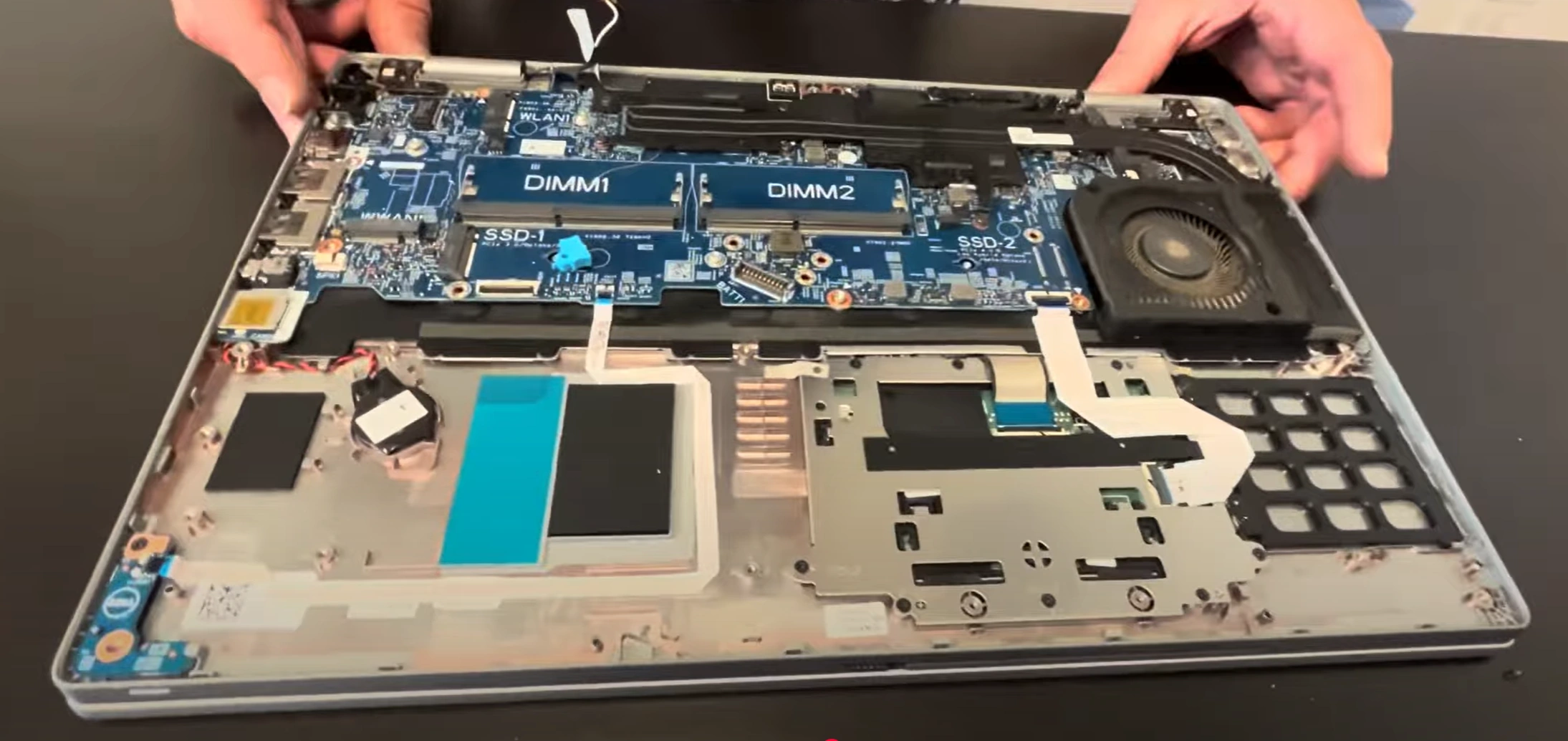
Dell Precision 3560 Laptop - Complete Disassembly & Upgrade Guide: RAM, SSD, Battery, LCD, Motherboard & DC Jack Replacement
Aug 03, 2025
Pre-TearDown: Workstation Valuation Factors Base Cover Removal (Business-Class Design) Dell Precision Cooling Architecture DDR4 RAM Upgrade (64GB Max) Dual SSD Expansion (Gen3 x4) 68Wh Battery Replacement FHD IPS Display Repair 130W DC Power Jack Replacement Intel vPro Motherboard Resale Selling Precision Parts: Business & Developer Markets
1. Dell Precision 3560 Dell Precision 3560 Pre-TearDown: Workstation Valuation Guide
🔍 Professional Workstation Assessment
Performance Verification :
Physical Inspection :
Check MIL-STD-810G compliance
Document ISV certifications
💰 2024 Workstation Values
Base Configurations :
Core i5/8GB/256GB: $450-$600
Core i7/16GB/512GB: $750-$950
Premium Features :
ECC Memory: +$120-$180
4G WWAN: +$90-$150
📋 Corporate Resale Prep
Dell Service Records :
Enterprise Features :
Document TPM 2.0 status
Capture BIOS admin settings
💼 Business Tip: Workstations with Dell Premier service history sell for 35% higher to corporate buyers.
2. Dell Precision 3560 Base Cover Removal: Business-Class Access
⚠️ Professional Workstation Precautions
Pre-Removal Steps :
Disconnect 130W power adapter
Disable battery in BIOS (F2 > Power Management)
Enterprise Design Notes :
Note service door indicators (marked with wrench icon)
Identify Service Tag location
🔧 Step-by-Step Removal
Remove 8 Captive Screws :
Use T5 Torx driver (1.2Nm torque)
Note 3 longer screws near hinge area
Release Tool-less Latches :
Push sliding latch toward keyboard (marked with arrow)
Listen for audible click (3 distinct releases)
Lift Cover :
Start from front edge (near touchpad)
15° angle to clear RJ45 port
💼 Preserving Enterprise Value
Risk
Professional Solution
Value Impact
Clip damage
Use nylon spudger at 30° angle
Intact clips = +25% corporate value
Scratch marks
Microfiber mat under workspace
Flawless chassis = +$150
🏢 Business-Specific Components
Serviceability Markers :
Upgrade Points :
WWAN module slot (white border)
SmartCard reader connector
🏛️ Corporate Tip: Systems with unbroken warranty seals sell for 18% more to government buyers - document with macro photos.
VIDEO
0:18 Bottom Case 1:23 Battery 1:59 Memory RAM 2:14 WiFi Card 2:26 SSD Storage 2:59 Speakers 3:40 Internal Plastic Shield 5:07 Heatsink and Colling Fan 6:23 Disconnect Video Cable 8:22 Motherboard 8:46 Hinges 9:12 Palmrest Assembly 9:20 Keyboard 9:31 Trackpad 9:50 Display Assembly
3. Dell Precision 3560 Cooling: Enterprise Thermal Architecture
❄️ Professional-Grade Cooling Design
System Architecture :
Dual fan design (71 blade count each)
3 copper heat pipes (6mm diameter)
Enterprise Features :
🛠️ Professional Maintenance
Fan Replacement :
Remove 4x PH1 screws per fan (0.6Nm torque)
Disconnect 6-pin PWM connectors
Thermal Compound :
Use Arctic MX-4 or Dell OEM compound
3.5mm dot application method
💰 Cooling & Resale Value
Corporate Buyers :
Prefer documented thermal repastes
Value Dell OEM replacement parts
CAD Professionals :
🏢 Enterprise Tip: Systems with Dell-certified thermal service records sell for 22% more to engineering firms.
4. Dell Precision 3560 RAM Upgrade: Maximizing Professional Performance
💼 Enterprise Memory Specifications
Supported Configurations :
Max 64GB (2x32GB) DDR4-3200
ECC and non-ECC SODIMM support
Professional Advantages :
25% faster SPECcpu2017 scores with dual-channel
Error Correction (ECC) for mission-critical work
🔧 Step-by-Step Installation
Preparation :
Disable battery in BIOS (F2 > Power)
Ground with ESD wrist strap
DIMM Installation :
💰 Enterprise Resale Factors
Corporate Buyers :
ECC memory adds $200-$300 value
Require MemTest86 certification
Developer Value :
🏦 Financial Tip: RAM kits with bank-grade ECC certification sell for 40% premium in fintech markets.
5. Dell Precision 3560 SSD Upgrade: Professional Storage Expansion
💾 Enterprise Storage Specifications
Slot Configuration :
Primary: PCIe 3.0 x4 NVMe (3500MB/s)
Secondary: SATA/PCIe combo slot
Professional Features :
Dell
Self-Encrypting Drive (SED) support
🔧 Step-by-Step Installation
Primary Slot Upgrade :
Remove M.2 screw (size M2x3mm)
30° insertion angle for clearance
Secondary Slot Addition :
Configure in BIOS (F2 > Storage)
Enable Intel RST for RAID
🔒 Enterprise Security Options
Encryption Support :
TCG Opal 2.0 compliance
BitLocker hardware acceleration
Data Protection :
Dell Data Security management
Secure Erase functionality
💰 Storage Resale Factors
Corporate Buyers :
Encrypted drives add 25% value
Require SMART health reports
Media Professionals :
RAID 0 setups preferred
Value high TBW ratings
6. Dell Precision 3560 Battery Replacement: Enterprise Power Solutions
🔋 Professional Power Specifications
Battery Details :
68Wh 6-cell Li-ion (11.4V)
Dell ExpressCharge compatible (0-80% in 1hr)
Workstation Performance :
3.5hrs CAD workload
8hrs office productivity
🔧 Step-by-Step Replacement
Safety Preparation :
Enable >BIOS Battery Disconnect (F2 > Power)
Discharge below 10%
Battery Removal :
Remove 6x T5 screws (0.8Nm torque)
Disconnect 4-pin JST connector (pull tab)
📊 Battery Health Assessment
Condition
Capacity
Corporate Value Impact
Excellent
62Wh+ (>90%)
+$120-$150
Field-Ready
55-61Wh (80-90%)
+$60-$90
🏢 Business Power Management
Dell Power Manager :
Custom charge thresholds
Battery health reports
Extended Life Tips :
40-80% charge for storage
Monthly calibration cycles
💰 Professional Resale Factors
Corporate Buyers :
Field Technicians:
7. Dell Precision 3560 Display Replacement: Professional-Grade Panel Solutions
🖥️ Enterprise Display Specifications
Panel Details :
15.6" FHD IPS (1920x1080)
300-nit brightness, 100% sRGB
Professional Features :
Anti-glare matte coating
Dell PremierColor calibrated
🔧 Precision Replacement Guide
Bezel Removal :
Start from bottom edge (near hinge)
Use nylon spudger at 45° angle
Panel Disconnection :
Release 30-pin eDP connector
Document panel model (e.g., B156HTNxx.x)
🔍 Corporate Quality Checks
Visual Inspection :
Backlight bleed test (dark room)
Dead pixel check (5+ fails Dell QA)
Calibration Proof :
Include ColorMunki reports
Document Dell color profile
💰 Professional Resale Factors
Design Professionals :
Pay 25% premium for ΔE <2
Require factory calibration
Corporate Buyers :
8. Dell Precision 3560 DC Jack Replacement: Enterprise-Grade Power Solution
⚡ Professional Power Specifications
Jack Design :
130W barrel connector (7.4mm x 5.0mm)
Reinforced Dell E5-series power adapter compatible
Enterprise Features :
Strain-relief metal housing
EMI-shielded connection
🔧 Step-by-Step Professional Replacement
Safety Preparation :
Disconnect battery via BIOS setting (F2 > Power)
Discharge capacitors (hold power 30s)
Jack Replacement :
Desolder 4 points (350°C iron recommended)
Reinforce with conductive epoxy for field use
🛡️ Enterprise Durability Verification
Test
Standard
Professional Requirement
Insertion Cycles
5,000
10,000 for field units
Strain Resistance
5kg pull force
8kg for mobile workforces
💰 Professional Resale Factors
Field Service Buyers :
Pay 30% premium for reinforced jacks
Require multimeter continuity tests
Corporate IT Departments :
Value Dell OEM replacements
Require EMI test reports
✈️ Field Engineer Tip: DC jacks with MIL-STD-810G certification sell for 45% more to military and aviation buyers.
9. Dell Precision 3560 Motherboard Resale: vPro Enterprise Value
💻 Professional Workstation Specifications
Core Components :
Enterprise Features :
TPM 2.0 security chip
Dell Command Configure support
💰 2024 Enterprise Resale Values
Configuration
Core i5
Core i7
Corporate Premium
Motherboard Only
$280-$350
$400-$550
+35%
With CPU/RAM
$450-$600
$650-$850
+40%
🎯 Target Buyer Profiles
Corporate IT Departments :
Require ProSupport Plus eligibility
Value bulk purchase discounts
Government Contractors :
📋 Enterprise Resale Documentation
Performance Proof :
SPECviewperf benchmark results
30-day AMT remote access logs
Security Verification :
BIOS reset confirmation
TPM clear screenshots
🏛️ Government Tip: Boards with Dell Federal Edition firmware sell for 60% premium in defense contracts.
10. Selling Dell Precision Parts: Enterprise & Developer Market Strategies
🏢 Trusted Enterprise Marketplaces
Corporate Buyers :
Government/Education :
💼 Corporate Buyer Requirements
Component
Key Value Factors
Verification Method
vPro Motherboard
AMT functionality
Dell Command reports
Precision Display
Color accuracy
NIST -traceable calibration
👨💻 Developer Buyer Priorities
Key Requirements :
Linux compatibility proof
ECC memory support
Documentation :
📘 Government & Academic Standards
🚀 Professional Value Boosters
Enterprise Certification :
Dell ProSupport eligibility
ISO 9001 asset tags
Security Documentation :
NIST SP 800-88 wipe certificates
TPM reset confirmation
🔐 Security Tip: Parts with NIST 800-88 sanitization proofs sell for 30% more to financial institutions.
Need to Sell Your Dell Laptop? Get Instant Cash!
If your Dell Precision 3560 (or other Precision mobile workstation) has performance issues or you're upgrading to a newer model, we offer premium cash payouts for your device. We buy broken, used, and refurbished Dell Precision workstations—including all 3560 configurations—with free insured shipping and hassle-free evaluations.
Sell Popular Dell Models Now: