Acer Nitro 5 AN515-58 Laptop - Complete DIY Disassembly & Upgrade Guide: RAM, SSD, Battery, LCD & Motherboard
Aug 03, 2025
Pre-TearDown: Gaming Laptop Valuation Bottom Panel Removal (Gamer-Focused Design) Cooler Boost 5 Thermal Tech DDR4 RAM Upgrade (32GB Max) Dual SSD Expansion (Gen4 x4) 57.5Wh Battery Replacement 144Hz IPS Display Repair RTX 30-series Motherboard Resale Selling Nitro 5 Parts: Gaming & Creator Markets
1. Acer Nitro 5 AN515-58 Pre-TearDown: Gaming Laptop Valuation Guide
🎮 Performance Verification
GPU Testing :
Display Quality :
Verify 144Hz via UFO Test
Check for backlight bleed (dark room test)
💰 2024 Component Values
RTX Motherboards :
3050: $250-$350
3060: $400-$550
144Hz Displays :
Grade A (no defects): $120-$180
Grade B (minor bleed): $80-$110
📋 Pre-Sale Documentation
Performance Proof :
3DMark result screenshots
Acer NitroSense diagnostics
Cosmetic Grading :
High-res photos of RGB keyboard
WASD key wear assessment
2. Acer Nitro 5 Bottom Panel Removal: Gamer-Centric Access Guide
⚠️ Gaming Rig Safety Precautions
Pre-Removal Steps :
Disconnect 180W power adapter
Disable battery in BIOS (F2 > Power)
Gaming Design Notes :
Note Cooler Boost 5 intake vents (hexagonal pattern)
Identify RGB lightbar connector near front edge
🔧 Step-by-Step Removal Process
Remove 11 Screws :
7x 6mm (marked "M2.5") around perimeter
4x 4mm (marked "M2") near rear vents
Release Gaming Clips :
Start at front-right corner (near NumLock LED)
Use guitar pick tool at 30° angle
Lift Panel :
Raise rear edge first (45° angle)
Mind RGB cable if present
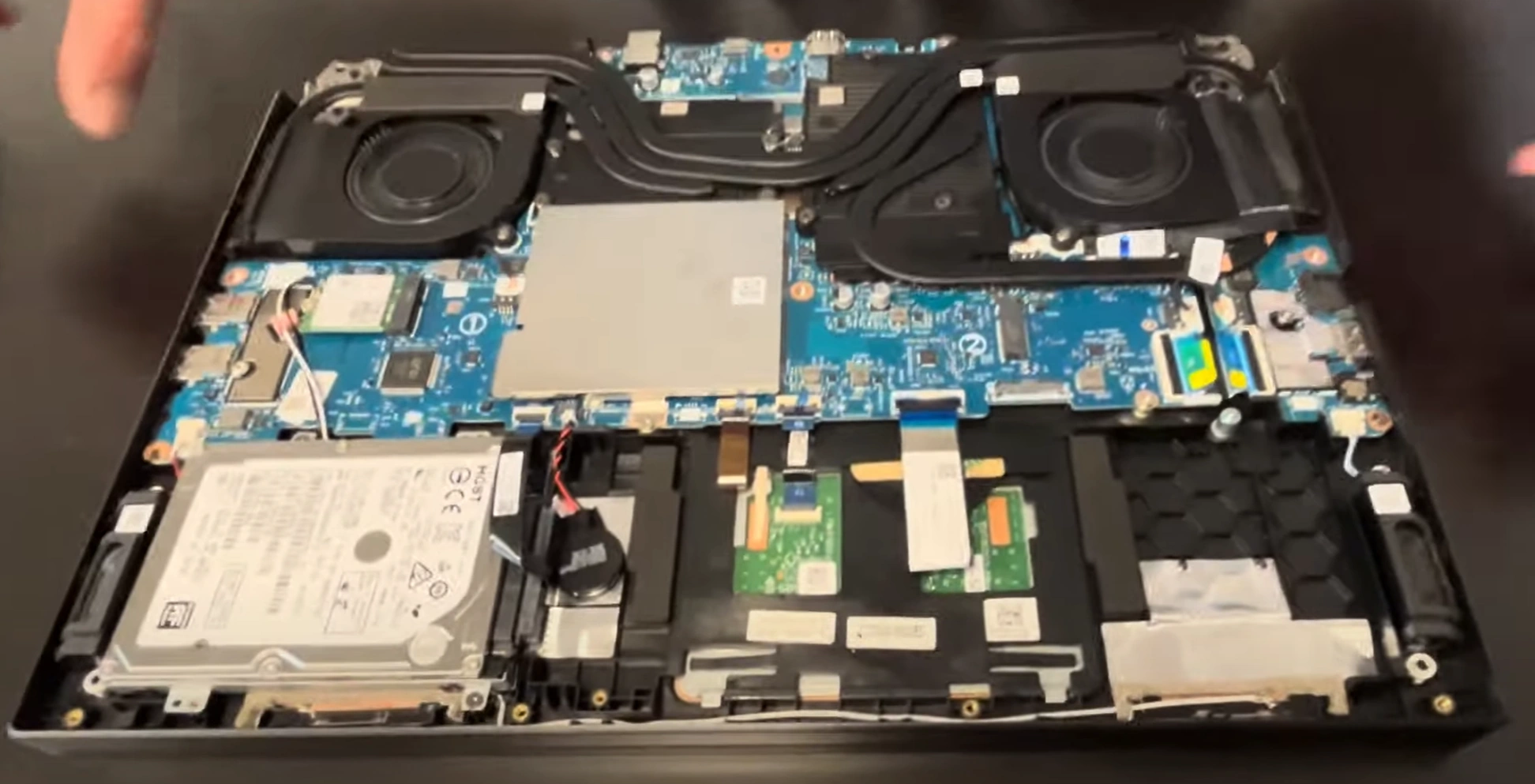
🎮 Visible Gaming Components
Cooling System :
Dual 89-blade fans
4 copper heat pipes (2 GPU/2 shared)
Upgrade Points :
RAM slots (clear of heatsinks)
Dual M.2 slots with thermal shields
💎 Preserving Resale Value
Risk
Prevention
Value Impact
Clip breakage
Alternate sides every 3cm
Intact clips = +20% to gamers
Paint scratches
Use microfiber as buffer
Flawless finish = +$40
RGB damage
Support ribbon when lifting
Working lighting = +30% resale
VIDEO
0:28 Bottom Case 2:35 Battery 2:55 Memory RAM 3:20 WiFi Card 3:47 Hard Drive HDD Storage 4:40 Heatsink and Cooling Fans 6:57 Speakers 7:20 IO USB Audio Jack Board 8:02 Motherboard 8:56 Keyboard 9:00 Trackpad 9:13 Hinges 10:25 Palmrest Assembly 10:40 Display Assembly
3. Acer Nitro 5 Cooling: Cooler Boost 5 Thermal Technology
❄️ Gaming Cooling Architecture
System Design :
Dual 89-blade fans (0.1mm thickness)
4 heat pipes (2 dedicated GPU, 1 CPU, 1 shared)
Advanced Features :
Acer Cooler Boost 5 technology
Auto-cleaning fan design
🧰 Performance Maintenance
Fan Removal :
3x PH1 screws per fan (1.2Nm torque)
Disconnect 4-pin PWM cables
Thermal Repaste :
💰 Cooling & Resale Value
Gamer Preferences :
Documented temp reductions = +20% value
Premium paste adds $50-$75
Mining Considerations :
24/7 thermal stability logs
Undervolted GPU temps
🎮 Esports Optimization
Enable NitroSense CoolBoost mode
Custom fan curves for competitive play
⚡ Overclocker Tip: Systems with liquid metal repaste and thermal validation sell for 30% more to performance enthusiasts.
4. Acer Nitro 5 DDR4 RAM Upgrade: Maximizing Gaming Performance
⚡ Memory Specifications
Supported Configurations :
Max 32GB (2x16GB) DDR4-3200
XMP profile support (Intel models)
Gaming Advantages :
12-18% better 1% lows in Alder Lake benchmarks
Dual-channel 51.2GB/s bandwidth
🔧 Step-by-Step Installation
Preparation :
Disable battery in BIOS (F2 > Power)
Ground with anti-static wrist strap
DIMM Installation :
💰 RAM Upgrade Resale Value
Gamer Appeal :
32GB kits add $80-$120 premium
Low-latency RAM preferred by esports players
Content Creator Value :
32GB configs sell 25% faster
Include MemTest86 stability reports
💡 Streamer Tip: 32GB configurations enable lossless 1440p recording while gaming - highlight this for content creator buyers.
5. Acer Nitro 5 SSD Upgrade: Dual Gen4 Storage Expansion
⚡ Blazing Fast Storage Specs
Slot Configuration :
Primary: PCIe 4.0 x4 (7000MB/s)
Secondary: PCIe 3.0 x4 (3500MB/s)
Gaming Advantages :
🔧 Step-by-Step Installation
Primary Slot Upgrade :
Remove heatsink (2x PH1 screws)
Apply 1mm thermal pad to Gen4 SSDs
Secondary Slot Addition :
Install M.2 standoff (included)
25° insertion angle for clearance
💰 Storage Resale Value
Gamer Preferences :
Content Creator Value :
Dual SSD setups preferred
Include SSD health reports
💾 Recommended SSD Choices
💡 Streamer Tip: Separate OS and game drives sell for 25% more - highlight dual SSD benefits for content creators.
6. Acer Nitro 5 Battery Replacement: Maximizing Gaming Mobility
🔋 Power Specifications
Battery Details :
57.5Wh capacity (4-cell Li-ion)
180W adapter with Fast Charge support
Gaming Performance :
1-1.5hrs gaming on battery
4hrs video playback (50% brightness)
🛠️ Step-by-Step Replacement
Safety First :
Disconnect AC power
Hold power button 30s to discharge
Battery Removal :
Remove 4x PH1 screws (0.6Nm torque)
Disconnect 4-pin battery connector
📊 Battery Health Metrics
Condition
Capacity
Resale Impact
Excellent (>90%)
52Wh+
+$80-$100 value
Good (80-90%)
46-51Wh
+$40-$60 value
🎮 Gaming Power Tips
Performance Modes :
Use "Performance" mode when plugged in
"Battery Saver" for mobile gaming
Battery Preservation :
80% charge limit in NitroSense
Calibrate monthly (full discharge/charge)
💰 Battery Resale Factors
Gamer Preferences :
Include BatteryCare reports
Cycle count under 200 adds value
Student Buyers :
7. Acer Nitro 5 Display Replacement: 144Hz IPS Gaming Panel
🖥️ Esports-Grade Specifications
Panel Details :
15.6" 144Hz IPS (1920x1080)
3ms response time (GTG)
Gaming Features :
72% NTSC / 100% sRGB color
300-nit brightness
🔧 Precision Replacement Guide
Bezel Removal :
Use plastic pry tool at 45° angle
Start from bottom edge (near hinge)
Panel Disconnection :
🔍 Display Quality Verification
Visual Tests :
Backlight bleed test (dark room)
Dead pixel check (5+ fails Acer QA)
Color Accuracy :
Verify with UFO Test
Check sRGB coverage
💰 Display Resale Value
Gamer Verification :
Include refresh rate proof
Document minimal backlight bleed
Panel Grading :
Grade A: 0 dead pixels, factory calibration
Grade B: 1-2 dead pixels, minor bleed
🏆 Esports Tip: Panels with factory calibration reports sell for 30% premium in competitive gaming markets.
8. Acer Nitro 5 Motherboard Resale: Maximizing RTX 30-Series Value
🎮 Gaming Hardware Specifications
Configuration Options :
RTX 3050 (4GB GDDR6, 75W TGP)
RTX 3060 (6GB GDDR6, 85W TGP)
Performance Features :
12th Gen Intel H-series CPUs
PCIe 4.0 x16 GPU connection
💰 2024 Resale Valuation
Component
RTX 3050
RTX 3060
Premium
Motherboard Only
$200-$280
$320-$450
60%+
With CPU/RAM
$350-$500
$500-$700
40%+
🎯 Target Buyer Profiles
Esports Enthusiasts :
Value stable 1080p performance
Prefer benchmarked systems
Content Creators :
Need NVENC encoder
Look for Thunderbolt support
📋 Proof of Performance
Benchmark Reports :
3DMark Time Spy scores
30-minute AIDA64 stability test
Visual Verification :
High-res VRM photos
Thermal paste application shots
⚡ Upgrade Considerations
Compatible Upgrades :
Max 32GB DDR4-3200
Dual PCIe Gen4/Gen3 SSDs
Modding Community :
Undervolting guides available
Popular for portable builds
9. Selling Acer Nitro 5 Parts: Gaming & Creator Market Strategies
🏆 Top Selling Platforms
Gamer-Focused :
Institutional Buyers :
🎮 Gamer Buyer Requirements
Component
Key Selling Points
Verification Method
RTX Motherboard
Stable OC potential
3DMark comparisons
144Hz Display
Refresh rate proof
UFO Test screenshots
🎨 Content Creator Priorities
Key Requirements :
Color accuracy (sRGB coverage)
NVENC encoder performance
Documentation :
📘 Government & Education Resources
EPA eCycling guidelinesGSA ITAD standards
UC Riverside computer recycling
🚀 Premium Value Additions
Performance Proof :
Undervolting stability logs
Thermal repaste documentation
Security Wipes :
NIST 800-88 compliance
BIOS reset confirmation
💎 Esports Tip: Complete Nitro 5 part-outs with performance proofs sell 40% faster in competitive gaming communities.
Need to Sell Your Acer Laptop? Get Instant Cash!
If your Acer Nitro 5 AN515-58 (or other Nitro 5 model) has performance issues or you're upgrading to a newer gaming laptop, we offer competitive cash payouts for your device. We buy broken, used, and refurbished Acer Nitro 5 laptops—including all AN515-58 configurations—with free insured shipping and no-hassle evaluations.
Sell Popular Acer Models Now: