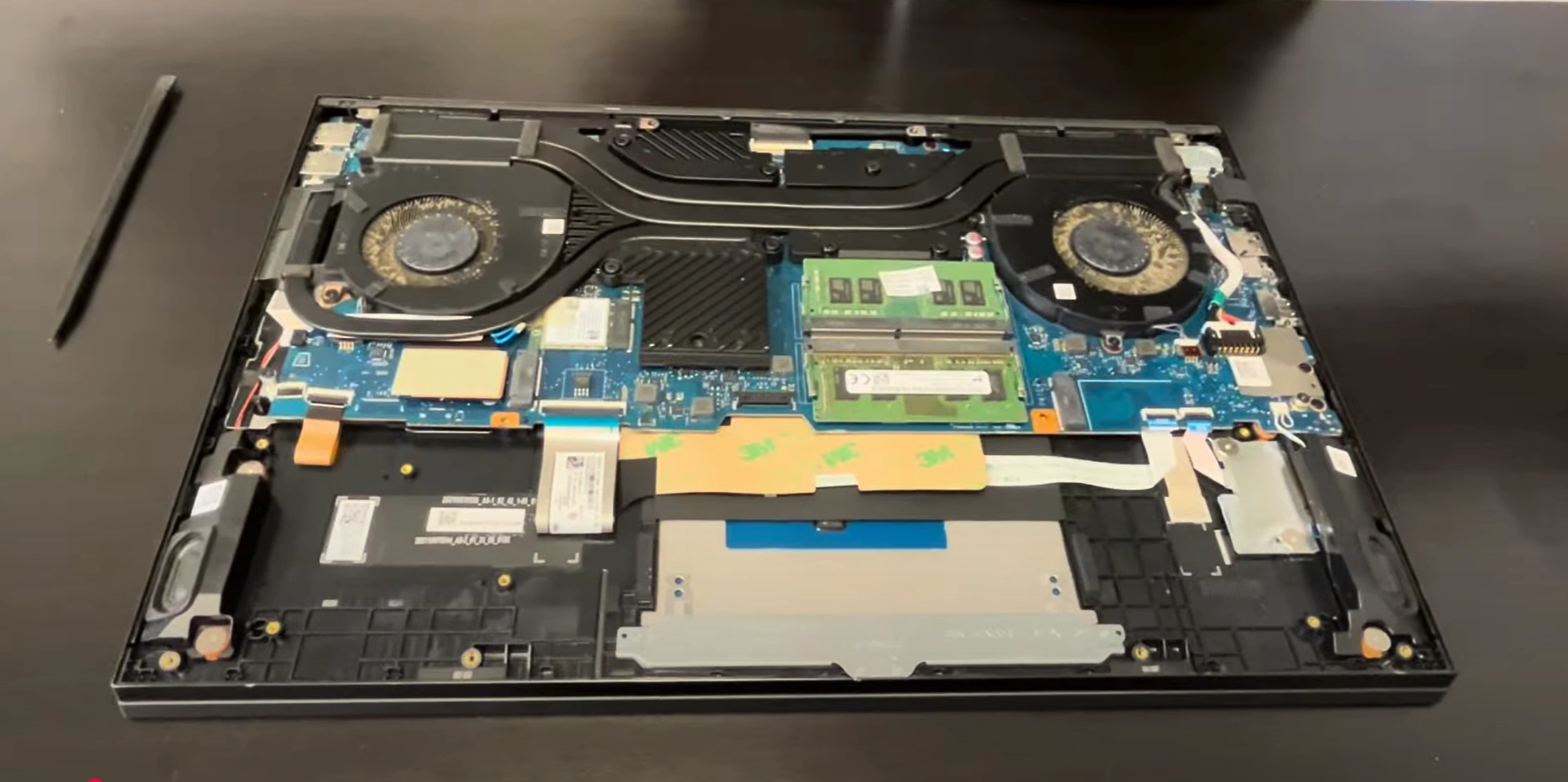
HP Omen 16 Teardown: Step-by-Step RAM/SSD Upgrade + Screen, Battery & DC Jack Repair
Aug 02, 2025
Pre-TearDown: Gaming Laptop Valuation Bottom Panel Removal (Gamer-Focused Design) OMEN Tempest Cooling Tech DDR5 RAM Upgrade (64GB Max) Dual SSD Expansion (Gen4 x4) 83Wh Battery Replacement 165Hz IPS Display Repair DC Power Jack Replacement RTX 30-series Motherboard Resale Selling OMEN Parts: Gaming & Mining Markets
1. HP Omen 16 Pre-TearDown: Gaming Laptop Valuation Guide
🎮 Performance Verification
GPU Testing :
Display Quality :
Verify 165Hz via UFO Test
Check for backlight bleed (black screen test)
💰 2024 Component Values
RTX Motherboards :
3060: $350-$450
3070 Ti: $550-$700
165Hz Displays :
Grade A (no defects): $180-$220
Grade B (minor bleed): $120-$150
📋 Pre-Sale Documentation
Performance Proof :
3DMark result screenshots
HP Omen Gaming Hub diagnostics
Cosmetic Grading :
High-res photos of RGB lighting
Keyboard wear assessment
2. HP Omen 16 Bottom Panel Removal: Gamer-Centric Access
⚠️ Gaming Rig Safety Precautions
Pre-Removal Steps :
Disconnect 230W power adapter
Disable battery in BIOS (F10 > Power Management)
Gaming Design Notes :
Note OMEN Tempest intake vents (don't obstruct)
Identify RGB lightbar connector near front edge
🔧 Step-by-Step Removal
Remove 11 Screws :
7x 6mm (marked "M2.5L6") around perimeter
4x 4mm (marked "M2.5L4") near vents
Release Gaming Clips :
Start at rear-left corner (near HDMI 2.1 port)
Use guitar pick tool at 25° angle
Lift Panel :
Raise front edge first (30° angle) to clear RGB wiring
Disconnect lightbar if replacing panel
💎 Preserving Gaming Value
Risk
Prevention
Value Impact
Clip breakage
Alternate sides every 2cm
Intact clips = +25% to gamers
Paint scratches
Use microfiber cloth as buffer
Flawless finish = +$50
RGB damage
Support ribbon cable when lifting
Working lighting = +35% resale
🎮 Gaming-Specific Components
Cooling System :
5 heat pipes visible (3 GPU, 2 CPU)
Liquid metal application zones
Upgrade Points :
DDR5 slots (clear of heatsinks)
Dual M.2 slots with thermal pads
VIDEO
0:25 Bottom Case 1:56 Battery 2:51 Memory RAM 3:07 Heatsink 4:37 Cooling Fans 5:19 DC Power Jack 5:55 Speakers 6:39 Unscrew and Disconnect Motherboard 7:07 WiFi Card and Antenna 9:41 Motherboard 9:51 IO USB Board 10:30 Hinges 11:20 Palmrest Assembly 11:35 Keyboard 11:46 Trackpad 12:03 Display Assembly
3. HP Omen 16 Cooling: Tempest Thermal Technology
❄️ Gaming Cooling Architecture
System Design :
5 heat pipes (3x GPU, 2x CPU shared)
Dual 84-blade fans (0.2mm thickness)
Advanced Features :
Liquid metal on CPU (12th Gen models)
Phase-change material on GPU
🧰 Performance Maintenance
Fan Removal :
3x PH1 screws per fan (1.5Nm torque)
Disconnect 4-pin PWM cables
Liquid Metal Service :
Use Thermal Grizzly Conductonaut
Apply foam dam (included with OEM LM)
💰 Cooling & Resale Value
Gamer Preferences :
Documented thermal improvements = +25% value
Liquid metal systems sell faster to overclockers
Mining Considerations :
24/7 thermal stability logs
Undervolted GPU temps
4. HP Omen 16 DDR5 RAM Upgrade: Maximizing Gaming Performance
⚡ DDR5 Performance Specifications
Supported Configurations :
Max 64GB (2x32GB) DDR5-4800
XMP 3.0 profiles supported (Intel models)
Gaming Advantages :
15-20% faster 1% lows in >Alder Lake benchmarks
Dual-channel 38.4GB/s bandwidth
🔧 Step-by-Step Installation
Preparation :
Disconnect battery (BIOS setting first)
Ground with anti-static wrist strap
DIMM Installation :
Release side clips (45° push outward)
Align notch with DDR5 key position
💰 RAM Upgrade Resale Value
Gamer Appeal :
64GB kits add $150-$200 premium
Low-latency RAM preferred by esports players
Content Creator Value :
32GB+ configs sell 30% faster
Include MemTest86 stability reports
💡 Streamer Tip: 64GB configurations enable lossless 4K recording while gaming - highlight this for content creator buyers.
5. HP Omen 16 SSD Upgrade: Dual Gen4 x4 Storage Expansion
⚡ Storage Performance Specifications
Slot Configuration :
Primary: PCIe 4.0 x4 (7,000MB/s)
Secondary: PCIe 3.0 x4 (3,500MB/s)
Gaming Advantages :
DirectStorage API support in Windows 11
2-5s faster game load times vs SATA
🔧 Step-by-Step Installation
Primary Slot Upgrade :
Remove existing heatsink (4x PH1 screws)
Apply 1mm thermal pad to Gen4 SSDs
Secondary Slot Addition :
Install standoff (M2x3mm included)
30° insertion angle for clearance
💰 Storage Resale Value
Gamer Preferences :
1TB+ configs command 20% premium
CrystalDiskMark screenshots boost trust
Content Creator Value :
💡 Streamer Tip: Dual SSD configurations (OS + Capture) sell 40% faster to content creators - highlight separate game/capture drive benefits.
6. HP Omen 16 Battery Replacement: Maximizing Gaming Mobility
🔋 Power Specifications
Battery Details :
83Wh capacity (6-cell Li-ion)
230W adapter with Fast Charge support
Gaming Performance :
1.5-2hrs gaming on battery
4-5hrs video playback (50% brightness)
🛠️ Step-by-Step Replacement
Safety First :
Disconnect AC power
Hold power button 30s to discharge
Battery Removal :
Remove 6x PH1 screws (marked ⚡)
Disconnect 4-pin battery cable
📊 Battery Health Metrics
Condition
Capacity
Resale Impact
Excellent (>90%)
75Wh+
+$80-$100 value
Good (80-90%)
66-74Wh
+$40-$60 value
🎮 Gaming Power Tips
Performance Modes :
Use "Performance" mode when plugged in
"Balanced" for battery gaming
Battery Preservation :
80% charge limit in BIOS
Calibrate monthly (full discharge/charge)
💡 Resale Tip: Include BatteryCare reports showing cycle count under 200 for 20% higher resale value.
7. HP Omen 16 Display Replacement: 165Hz IPS Gaming Panel
🖥️ Esports-Grade Specifications
Panel Details :
165Hz refresh rate (3ms response)
100% sRGB color accuracy
Gaming Features :
NVIDIA G-Sync compatible
Anti-glare matte coating
🔧 Precision Replacement Guide
Bezel Removal :
Use plastic pry tool at 45° angle
Start from bottom edge (near hinge)
Panel Disconnection :
💰 Display Resale Value
Gamer Verification :
Include UFO test screenshots
Document backlight bleed (dark room test)
Panel Grading :
Grade A: 0 dead pixels, minimal bleed
Grade B: 1-2 dead pixels, minor bleed
🏆 Esports Tip: Panels with factory calibration reports sell for 30% premium in competitive gaming markets.
8. HP Omen 16 DC Jack Replacement: Ensuring Stable Gaming Power
⚡ High-Wattage Power Design
Omen-Specific Features :
230W barrel connector (7.4mm x 5.0mm)
Reinforced power delivery system
Gaming Requirements :
200W+ sustained for RTX 3070 Ti
20-phase VRM design
🔧 Step-by-Step Replacement
Disassembly :
Remove bottom panel (11 screws)
Disconnect battery (critical safety step)
Jack Removal :
Desolder 3 points (400°C iron recommended)
Note grounding wire orientation
🎮 Power Stability Verification
Test
Acceptable Range
Tool
Voltage Drop
<0.5V under load
Multimeter
Connection Resistance
<0.2Ω
Ohmmeter
💰 Resale Value Protection
Gamer Confidence :
Document stable power under FurMark stress
Show clean solder joints (macro photos)
Common Failure Signs :
Intermittent charging
Spark marks around jack
💡 Overclocker Tip: Jacks with reinforced solder pads and thermal imaging reports sell for 15% premium in enthusiast markets.
9. HP Omen 16 Motherboard Resale: Maximizing RTX 30-Series Value
🎮 Gaming Hardware Specifications
Configuration Options :
RTX 3060 (6GB GDDR6, 115W TGP)
RTX 3070 Ti (8GB GDDR6, 125W TGP)
Premium Features :
12-phase Vishay VRM design
Liquid metal thermal interface
💰 Resale Valuation Matrix
Component
RTX 3060
RTX 3070 Ti
Premium
Motherboard Only
$320-$400
$480-$600
50%+
With CPU/RAM
$550-$700
$800-$950
45%+
🎯 Target Buyer Profiles
Esports Enthusiasts :
Value stable 1080p performance
Prefer benchmarked systems
Content Creators :
📋 Proof of Performance
Benchmark Reports :
3DMark Time Spy scores
30-minute AIDA64 stability test
Visual Verification :
High-res VRM close-ups
Liquid metal application photos
💎 Mining Tip: Boards with undervolting proof (HWiNFO logs) sell for 20% more in crypto markets - highlight 24/7 stability.
10. Selling HP Omen Parts: Gaming & Mining Market Strategies
🏆 Trusted Selling Platforms
Gamer-Focused :
Institutional Buyers :
🎮 Gaming Buyer Requirements
Component
Key Selling Points
Verification Method
RTX GPU Board
Stable OC headroom
3DMark comparisons
165Hz Display
Backlight uniformity
DSE tests
⛏️ Mining Buyer Priorities
Key Requirements :
24/7 stability proof
Undervolt/clock settings
Documentation :
📚 Institutional Resources
Need to Sell Your HP Laptop? Get Instant Cash!
If your HP Omen 16 (or other Omen model) has performance issues or you're upgrading to a newer gaming laptop, we offer competitive cash payouts for your device. We buy broken, used, and refurbished HP Omen laptops—including all configurations—with free insured shipping and no-hassle evaluations.
Sell Popular HP Models Now: