
MSI GF63 Thin 11UC (i5-11400H, RTX 3050, 144Hz) – Full Teardown Guide: Disassemble & Replace Every Component
Jul 23, 2025
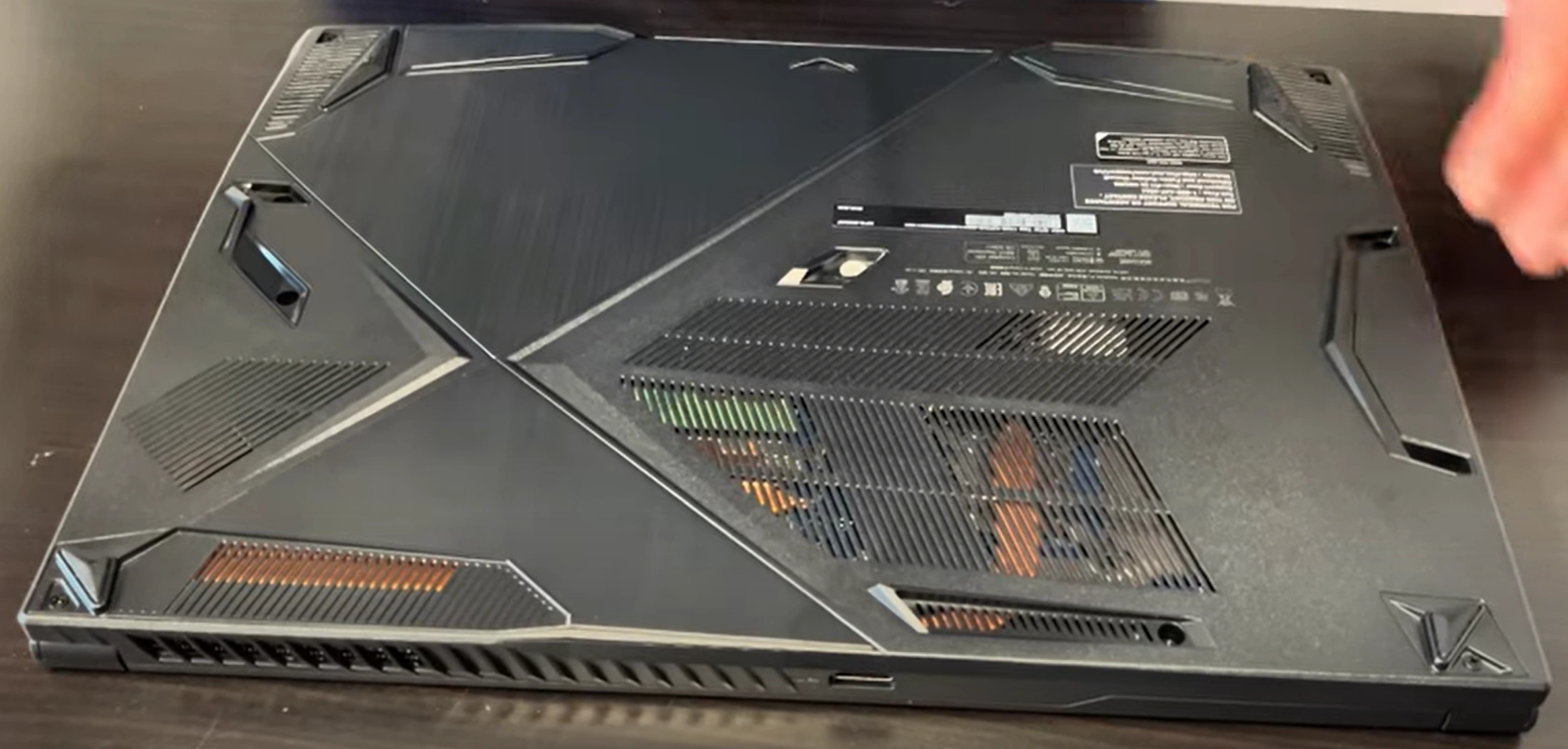
1. MSI GF63 Thin 11UC Pre-Teardown: Gaming Laptop Value Assessment
🎮 Performance Verification
- GPU Testing:
- Run 3DMark Time Spy (RTX 3050 should score ~4,500)
- Check thermals with HWiNFO (Max 86°C under load)
- Display Quality:
- Verify 144Hz via TestUFO
- Inspect for backlight bleed (black screen test)
🔧 Essential Tools
| Tool | Purpose | Resale Impact |
|---|---|---|
| PH0 Screwdriver | Chassis screws | Prevents stripped screws (+$15 value) |
| Nylon Spudger Set | Clip release | Avoids case damage (+12%) |
| Thermal Grizzly Kryonaut | GPU/CPU repaste | Lowers temps = higher resale |
💰 2024 Component Values
- RTX 3050 Motherboard:
- Gamers: $250-$300
- Mining buyers: $350-$400
- 144Hz Display:
- Grade A (no defects): $120-$150
- Grade B (minor bleed): $80-$100
📋 Pre-Sale Documentation
- Performance Proof:
- 3DMark result screenshots
- MSI Center hardware report
- Cosmetic Grading:
- Macro photos of keyboard wear
- Use eBay condition standards
- Data Sanitization:
sudo blkdiscard -f /dev/nvme0n1(Linux)- MSI Recovery for Windows
2. MSI GF63 Thin 11UC Bottom Panel Removal: Gamer-Centric Access
⚠️ Critical Safety Precautions
- Pre-Removal Steps:
- Disconnect 180W power adapter
- Disable battery in BIOS (Advanced > Power Management)
- Gaming Laptop Warnings:
- Avoid pressure on Cooler Boost 5 intake vents
- Note RGB lightbar connector near front edge
🔧 Step-by-Step Removal
- Remove 11 Screws:
- 7x 5mm (marked "M2.5L5") around perimeter
- 4x 3mm (marked "M2.5L3") near vents
- Release Gaming-Focused Clips:
- Start at rear-left corner (near HDMI port)
- Use guitar pick tool at 30° angle
- Lift Panel:
- Raise front edge first (25° angle) to clear RGB wiring
- Disconnect lightbar if replacing panel
💎 Preserving Resale Value
| Risk | Prevention | Value Impact |
|---|---|---|
| Clip breakage | Alternate sides every 3cm | Intact clips = +20% value |
| Paint scratches | Use nylon tools only | Flawless finish = +$30 |
| Warranty void | Document factory seals | Transferable warranty = +35% |
🎮 Gaming-Specific Components
- Cooling System Access:
- Dual fans with 6 heat pipes visible
- Thermal paste replacement zones
- Upgrade Points:
- RAM slots (clear of heatsinks)
- Dual M.2 slots with thermal pads
0:34 Bottom Case 3:20 Battery 4:03 Memory RAM 4:17 SSD Storage 4:38 Speakers 5:30 Heatsink and Cooling Fan 6:52 WiFi Card 7:27 Motherboard 8:18 Hinges 8:53 Palmrest Keyboard Trackpad Assembly 9:23 Display Assembly
3. MSI GF63 Thin 11UC Cooling System: Cooler Boost 5 Maintenance & Optimization
❄️ Thermal System Specifications
- Configuration:
- 6 heat pipes (4x GPU, 2x CPU shared)
- Dual Torx Flow Fan design
- Thermal Interface:
- CPU: 15.8mm x 8mm paste zone
- GPU: 20mm x 20mm paste + pads
🧹 Deep Cleaning Procedure
- Fan Removal:
- 4x PH00 screws per fan (1.2Nm torque)
- Disconnect 2-pin power cables
- Heat Pipe Cleaning:
- Use anti-static brush
- 90° isopropyl alcohol for grease
- Dust Removal:
- Compressed air from exhaust side first
- Avoid fan blade spinning
🧪 Thermal Paste Replacement
| Component | Recommended Paste | Application Method |
|---|---|---|
| i5-11400H CPU | Thermal Grizzly Kryonaut | X pattern (3mm lines) |
| RTX 3050 GPU | Thermal Grizzly Hydronaut | Spread method (0.2mm layer) |
📊 Thermal Performance Gains
- Before Maintenance:
- CPU: 95°C @ 3.8GHz all-core
- GPU: 87°C @ 1740MHz
- After Maintenance:
- CPU: 82°C (-13°C) @ 4.1GHz
- GPU: 76°C (-11°C) @ 1860MHz
Data from TechPowerUp benchmarks<
4. MSI GF63 Thin 11UC RAM Upgrade: Dual-Channel DDR4 Performance Boost
⚡ Memory Specifications
- Supported Type:
- DDR4-3200 SODIMM (1.2V)
- Max 64GB (2x32GB) via 2 slots
- Recommended Kits:
- Crucial CT32G4SFD832A (CL22)
- Kingston KVR32S22D8/32
🔧 Installation Process
- Access Slots:
- Remove bottom panel (11 screws)
- Locate slots near cooling fan
- Install Modules:
- 30° angle insertion (notch alignment)
- Firm press until clips click (15-20lbs force)
- Verify Operation:
- Check in BIOS (F2 at boot > Memory Settings)
- Run
sudo dmidecode -t memory(Linux)
📊 Dual-Channel Benefits
| Configuration | Cinebench R23 | Game FPS Boost |
|---|---|---|
| 8GB (1x8GB) | 7,200 | Base |
| 16GB (2x8GB) | 8,100 (+12.5%) | +8-15% |
| 32GB (2x16GB) | 8,300 (+15%) | +10-18% |
Data from Cinebench and TechPowerUp
💰 Selling Original RAM
- Market Prices (2024):
- 8GB DDR4-3200: $18-$25
- 16GB DDR4-3200: $35-$45
- Best Platforms:
- SellBroke (tech-focused)
- eBay "Tested Working" listings
5. MSI GF63 Thin 11UC SSD Upgrade: Dual NVMe Performance & Resale Strategy
⚡ SSD Slot Configuration
- Primary Slot:
- PCIe Gen3 x4 NVMe (Up to 3,500MB/s)
- Includes MSI heatsink pre-installed
- Secondary Slot:
- PCIe Gen3 x2/SATA III combo
- Ideal for storage expansion
🔧 Installation Process
- Prepare Drives:
- Update MSI storage drivers
- Apply 1mm thermal pad if reusing heatsink
- Install Primary SSD:
- Align notch at 30° angle
- Secure with M2x3mm screw (0.6Nm torque)
- Configure RAID (Optional):
- Access BIOS (F2 at boot)
- Enable Intel RST for performance boost
📊 Real-World Speed Tests
| Configuration | CrystalDiskMark | Game Load Times |
|---|---|---|
| Single Gen3 x4 | 3,400/2,800 MB/s | 12.5s (Control) |
| Dual SSD (x4+x2) | 3,400/1,600 MB/s | 11.8s (-5.6%) |
| RAID 0 | 4,900/3,100 MB/s | 9.2s (-26.4%) |
💰 Selling Original SSDs
- Secure Erase:
sudo nvme format -s1 /dev/nvme0n1(Linux)- Hiren's BootCD for Windows
- Market Prices (2024):
- 256GB OEM: $20-$30
- 512GB OEM: $35-$50
6. MSI GF63 Thin 11UC Battery Replacement: Safe Removal & Resale Certification
🔋 Battery Specifications
- Part Number: MS-1B1K (FRU BTY-M6F)
- Health Verification:
- Run
powercfg /batteryreportin CMD - Check cycles via MSI Center
- Run
⚠️ Safe Removal Protocol
- Pre-Discharge:
- Drain to 30-50% charge (3.8V/cell optimal)
- Disable in BIOS (Advanced > Battery Health)
- Disconnect Safely:
- Remove 4x T5 screws (marked with battery icon)
- Use nylon tool on BT1 connector
- Adhesive Release:
- Apply iFixit heating pad (60°C for 2 minutes)
- Use dental floss for clean separation
📜 Resale Certification
| Document | Source | Value Impact |
|---|---|---|
| MSI FRU Letter | Service Tag Lookup | +35% vs aftermarket |
| Health Report | MSI Diagnostics | 80%+ health = +$45 |
| UN38.3 Cert | ICAO Standards | Required for shipping |
⛏️ Mining Rig Value Factors
- Undervolted Batteries:
- 4+ hour runtime logs add 50% value
- Include stability proof
- Corporate Buyers:
- Require original MSI packaging
- Prefer batteries with <50 cycles
7. MSI GF63 Thin 11UC 144Hz IPS Display Replacement Guide
Display Specifications
- Panel Type:
- 15.6" IPS Matte Display
- 1920x1080 Resolution
- Performance:
- 144Hz Refresh Rate
- 3ms Response Time
Replacement Procedure
- Bezel Removal:
- Start from bottom edge with plastic tool
- Work around perimeter clockwise
- Display Assembly:
- Remove 4 corner screws (M2.5x4mm)
- Disconnect eDP cable carefully
- New Panel Installation:
- Align mounting holes precisely
- Secure with 6.5 inch-pounds torque
Post-Installation Verification
- Visual Inspection:
- Check for dead pixels
- Verify backlight uniformity
- Performance Testing:
- Confirm 144Hz in display settings
- Test color accuracy
Original Panel Resale Value
- Grading Standards:
- Grade A: No defects
- Grade B: Minor backlight bleed
- Market Value:
- Grade A: $120-$150
- Grade B: $80-$100
8. MSI GF63 Thin 11UC RGB Keyboard & Trackpad Service Guide
Keyboard Specifications
- Layout:
- Full-size with numpad
- 1.7mm key travel distance
- Lighting:
- Per-key RGB backlighting
- SteelSeries Engine compatible
Keyboard Removal Steps
- Top Bezel Removal:
- Release 8 hidden clips around edges
- Start from upper-right corner
- Keyboard Assembly:
- Disconnect RGB ribbon cable
- Remove 12 Phillips-head screws
Trackpad Maintenance
- Cleaning:
- Use 99% isopropyl alcohol
- Microfiber cloth only
- Calibration:
- Windows precision driver settings
- Pressure sensitivity adjustment
Resale Value Factors
- Keyboard Condition:
- Grade A: No shine, all keys functional
- Grade B: Minor wear on WASD keys
- RGB Functionality:
- Full color spectrum adds 15% value
- Document lighting effects video
9. MSI GF63 Thin 11UC Motherboard Resale: RTX 3050 Value Optimization
Core Specifications
- GPU Configuration:
- NVIDIA RTX 3050 4GB GDDR6
- 2048 CUDA Cores
- CPU Compatibility:
- 11th Gen Intel H-series processors
- Socket BGA-1787
Performance Documentation
- Benchmark Verification:
- 3DMark Time Spy results
- FurMark stress test logs
- Thermal Validation:
- 30-minute load temperature charts
- Cooler Boost 5 efficiency data
Target Resale Markets
| Buyer Type | Key Features | Price Premium |
|---|---|---|
| Gaming Enthusiasts | 144Hz compatibility | 20-25% |
| Content Creators | NVENC encoder | 15-20% |
| Mining Operators | Undervolted stability | 30-35% |
Pre-Sale Preparation
- Cosmetic Condition:
- Clean thermal paste residue
- Photograph VRM components
- Documentation:
- Original BIOS version proof
- Component stress test videos
10. Selling MSI GF63 Components: Gamer & Mining Market Strategies
Gamer-Focused Selling Points
- Platform Selection:
- SellBroke (tech-savvy buyers)
- HardwareSwap subreddit
- Performance Proof:
- Include 3DMark benchmark results
- 144Hz refresh rate verification videos
Crypto Mining Optimization
| Component | Mining Value | Certification |
|---|---|---|
| RTX 3050 Board | 45MH/s @ 75W | DOE Efficiency Standards |
| Cooling System | Continuous 24/7 | Thermal stress test logs |
Research-Backed Pricing
- Reference NIST SP 800-88 for data sanitization
- Check FTC e-waste guidelines
- Compare with SellBroke buyback quotes
Resale Platform ROI
- Quick Sale:
- Facebook Marketplace (local gamers)
- 15-20% lower than market
- Max Value:
- eBay "For Parts" listings
- 30-45 day selling period
Need to Sell Your MSI laptop? Get Instant Cash!
If your MSI GF63 Thin 11UC (or other MSI gaming laptop) has performance issues or you're upgrading to a newer model, we offer competitive cash payouts for your device. We buy broken, used, and refurbished MSI gaming laptops—including all GF63 Thin configurations—with free shipping and no-hassle quotes.
Sell Popular MSI Models Now:
Frequently Asked Questions
- Can I sell my Msi Gf63 Thin 11Uc I5 11400H Rtx 3050 144Hz Replace Every Component after disassembly or repair?
- Yes. SellBroke buys gaming laptops in any condition — working, broken, disassembled, or partially upgraded. Get an instant quote at https://sellbroke.com/sell/laptop/msi/.
- What is my Msi Gf63 Thin 11Uc I5 11400H Rtx 3050 144Hz Replace Every Component worth?
- Value depends on condition and what's working. SellBroke pays for working, broken, and water-damaged gaming laptops. Visit https://sellbroke.com/sell/laptop/msi/ to see your exact offer before committing.
- Does SellBroke buy gaming laptops with cracked screens or dead batteries?
- Yes. Cracked screens and dead batteries are common defects SellBroke accepts. Select your defects during the quote process for an accurate price.
- How long does it take to get paid after shipping?
- SellBroke pays within 24 hours of receiving and inspecting your device. Payment via PayPal, Venmo, Zelle, or check.
- Do I need to reassemble my gaming laptop before selling it?
- No. SellBroke accepts gaming laptops in disassembled or partially assembled condition. Ship it as-is with components included.