
Asus TUF Gaming F15 FX507 Complete Teardown: Replace/Upgrade RAM, SSD & More – Boost Value to Sell Your Old Laptop for Cash
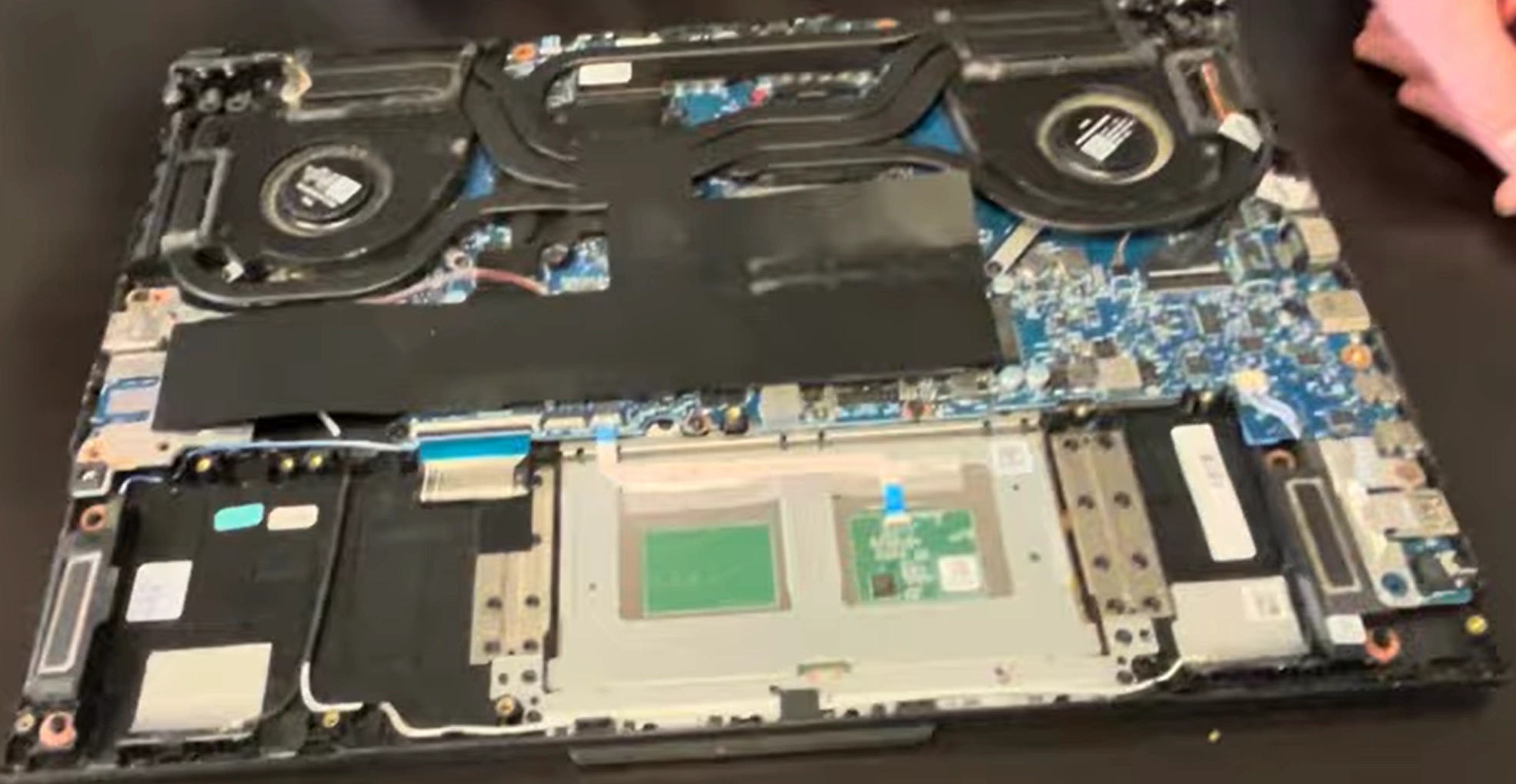
Got an old laptop like the Asus TUF Gaming F15 FX507 (RTX 30/40-series gaming workhorse) that’s slowing down or has issues? A quick DIY teardown, RAM/SSD upgrade, cleaning, and basic repairs can turn it into a high-value machine – perfect for getting cash for broken laptop (even if partially faulty) or doing a trade my laptop deal!
This guide shows full disassembly, upgrades, and tips to maximize resale price on marketplaces.
Why Upgrade & Repair Before Selling Your Asus TUF F15 FX507?
- More RAM (up to 64GB) + extra/fast SSD = snappier performance & modern feel
- Fix common issues (dust, thermal paste, battery) → even "broken" laptops sell higher
- Upgraded TUF models fetch 30–70% more cash – great for cash for broken laptop or trade my laptop
- TUF durability makes it easy to repair & appealing to buyers
Video Tutorial: Full Teardown, RAM/SSD Upgrade & Repairs
Watch this detailed YouTube guide for the Asus TUF Gaming F15 FX507 – covers disassembly, upgrades, battery access, and more (ideal for 2022–2025 models)!
0:22 Bottom Case 0:55 Battery 1:30 RAM Memory 1:50 SSD Storage 2:07 WiFi Card 2:33 Heatsink 3:58 Cooling Fans 4:18 Processor and GPU 4:27 USB Board 4:54 Motherboard 6:12 Speakers 6:40 Palmrest Assembly 6:47 Touchpad 7:10 Keyboard 7:28 Display Assembly 7:32 Front Bezel 8:43 Hinges 9:17 LCD Screen
Main Upgrade & Repair Options – Asus TUF Gaming F15 FX507
- RAM: 2× SODIMM slots – upgrade to 32GB or max 64GB (DDR4-3200 or DDR5-4800/5600 depending on your config – check your model!)
- Storage: 2× M.2 PCIe NVMe slots (Gen3/Gen4 support) – add/replace with 1TB–4TB+ SSDs easily
- Battery: Replaceable 56Wh or 90Wh pack (common part) – great fix for poor runtime in older units
- Access: Remove 12 bottom screws → lift panel → RAM, SSDs, battery & fans all reachable
- Bonus: Clean fans + reapply thermal paste → fixes overheating & throttling (huge buyer appeal!)
Quick Teardown & Upgrade Steps
- Power off, unplug, remove all 12 Phillips screws (one captive)
- Start prying from captive screw corner → gently remove bottom cover
- Disconnect battery cable first (safety!)
- Upgrade RAM: Insert new modules at 45° → press until clips snap
- Upgrade SSD: Unscrew M.2 drives → swap/insert new NVMe → secure
- Optional repairs: Clean dust, replace thermal paste, test battery
- Reassemble, power on, verify – ready to trade my laptop or sell!
Get Cash for Your Repaired/Upgraded Asus TUF F15 FX507
List it as: "Upgraded 32GB+ RAM + 2TB SSD – Fixed & Running Great!" Even if it was an old laptop or had minor issues, these fixes attract fast buyers and higher cash for broken laptop offers.
Use search terms like "cash for broken laptop Asus TUF upgraded", "trade my laptop FX507" or "sell old laptop gaming" – you’ll get way better deals!
Good luck with your DIY teardown and profitable sale! 💻🔧
Sell Popular Asus Laptop Models Now:



Frequently Asked Questions
- Can I sell my Asus Tuf Gaming F15 Fx507 Replace Value To Your after disassembly or repair?
- Yes. SellBroke buys gaming laptops in any condition — working, broken, disassembled, or partially upgraded. Get an instant quote at https://sellbroke.com/sell/gaming-laptop/.
- What is my Asus Tuf Gaming F15 Fx507 Replace Value To Your worth?
- Value depends on condition and what's working. SellBroke pays for working, broken, and water-damaged gaming laptops. Visit https://sellbroke.com/sell/gaming-laptop/ to see your exact offer before committing.
- Does SellBroke buy gaming laptops with cracked screens or dead batteries?
- Yes. Cracked screens and dead batteries are common defects SellBroke accepts. Select your defects during the quote process for an accurate price.
- How long does it take to get paid after shipping?
- SellBroke pays within 24 hours of receiving and inspecting your device. Payment via PayPal, Venmo, Zelle, or check.
- Do I need to reassemble my gaming laptop before selling it?
- No. SellBroke accepts gaming laptops in disassembled or partially assembled condition. Ship it as-is with components included.