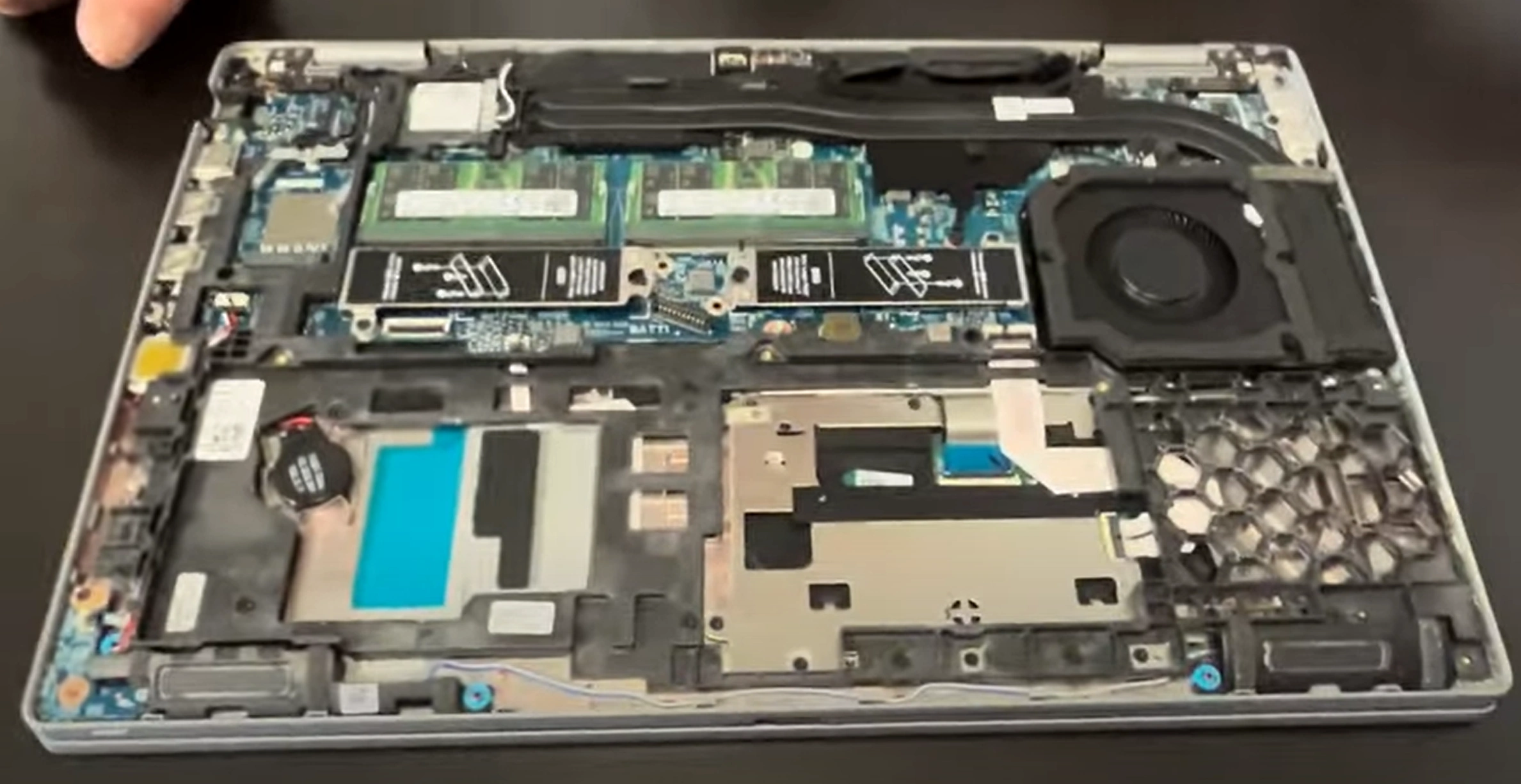
Dell Precision 3570 Laptop - Complete Disassembly & Upgrade Guide: RAM, SSD, Battery, LCD & Motherboard
Aug 02, 2025
Pre-TearDown: Workstation Valuation Bottom Panel Removal (ISV-Certified Design) Dell Precision Thermal Solution DDR5 SODIMM Upgrade (64GB Max) Dual NVMe SSD Expansion (Gen4 x4) 64Wh Battery Safety Removal FHD IPS LCD Service Backlit Keyboard & Number Pad 12th Gen i7 Motherboard Resale Selling Precision Parts: CAD & Engineering Markets
1. Dell Precision 3570 Pre-TearDown: Professional Workstation Valuation
💻 Workstation Performance Verification
ISV Certification Checks :
Validate Dell Service Tag for AutoCAD/SolidWorks certification
Run SPECviewperf benchmark tests
Professional Features :
Test NVIDIA T600 GPU with Quadro View software
Verify ECC memory functionality (if equipped)
📋 Corporate Documentation
Performance Proof :
SPECviewperf result screenshots
Dell SupportAssist hardware report
Asset Records :
Photograph Dell asset tag (bottom cover)
Document BIOS absolute settings
💰 2024 Workstation Values
Base Configurations :
i5-12500H + T600: $850-$1,100
i7-12700H + T600: $1,200-$1,500
Premium Factors :
Onsite warranty remaining (+25%)
Dell Precision Optimizer tuned (+15%)
2. Dell Precision 3570 Bottom Panel Removal: ISV-Certified Access
⚠️ Workstation Safety Precautions
Pre-Removal Steps :
Disconnect 130W power adapter
Disable battery via Dell BIOS Power Manager
Professional Design Notes :
Identify ISV certification labels (do not damage)
Note service loop for docking connector
🔧 Professional Removal Procedure
Release 9 Captive Screws :
Use T6 Torx driver (1.5Nm torque max)
Screws remain in panel (Dell's tool-less design)
Unlock ISV-Grade Clips :
Start near rear vents (reinforced area)
Use nylon spudger at 40° angle
Lift Panel :
Raise front edge first (15° angle)
Clear smart card reader cable if equipped
💼 Preserving Engineering Value
Risk
Professional Solution
Value Impact
ISV Label Damage
Photograph before removal
Intact labels = +35% CAD premium
Docking Connector Stress
Support service loop
Undamaged = +$200 to engineering firms
🏭 Workstation-Specific Components
Cooling System :
Dual fans with vapor chamber
Enterprise dust filtration
Upgrade Points :
DDR5 SODIMM slots (tool-less)
Dual M.2 with thermal shields
VIDEO
0:23 Bottom Case 1:19 Battery 1:51 SSD Drives Storage 2:41 Memory RAM 2:55 WiFi Card 3:26 Cooling Fan 3:49 Heatsink 4:55 Internal Plastic Shield 6:10 Speakers 7:26 Motherboard 9:40 Hinges 10:15 Palmrest Assembly 10:34 Keyboard 10:39 Trackpad 10:50 Display Assembly
3. Dell Precision 3570 Thermal Management: Workstation Cooling Solutions
❄️ Professional Thermal Architecture
Dual Cooling System :
Vapor chamber for CPU/GPU
Dual 56-blade fans with Dell Smart Cooling
Performance Parameters :
Max GPU temp: 87°C (NVIDIA spec)
Acoustic limit: 35dBA under CAD load
🛠️ Engineering-Grade Maintenance
Fan Assembly Removal :
4x T8 screws (marked with blue threadlocker)
Disconnect dual 4-pin PWM cables
Vapor Chamber Service :
🧰 Workstation Thermal Materials
Component
Professional Solution
CAD Benefit
CPU (12th Gen)
Thermal Grizzly Kryonaut Extreme
Sustains turbo boost 20% longer
NVIDIA T600
Gelid GC Extreme pads
Prevents ISV software throttling
4. Dell Precision 3570 Memory Upgrade: DDR5 SODIMM Performance
⚡ Professional Memory Specifications
Supported Configuration :
DDR5-4800 SODIMM (1.1V)
Dual-channel, 64GB max (2×32GB)
Enterprise Features :
On-die ECC (non-registered only)
Intel XMP 3.0 profile support
🔧 Workstation-Grade Installation
Access Slots :
Remove bottom panel (9 captive screws)
Locate tool-less SODIMM slots near fan
Install Modules :
30° angle insertion (notch alignment)
Firm press until clips engage (audible click)
💼 Professional RAM Recommendations
Dell-Certified Kits :
Dell 32GB Kit (2×16GB)
Samsung M425R4GA3BB0-CQKOD (32GB module)
Performance Tuning :
Enable XMP in BIOS (Performance tab)
Run MemTest86 for 4+ passes
5. Dell Precision 3570 SSD Upgrade: Dual PCIe Gen4 Performance
⚡ Enterprise Storage Specifications
Slot Configuration :
Primary: PCIe Gen4 x4 (7,000MB/s)
Secondary: PCIe Gen3 x4 (3,500MB/s)
Professional Features :
Dell ExpressFlash support
RAID 0/1 capable via BIOS
🔧 Workstation Installation
Primary Slot (Gen4) :
Remove M2x3mm screw with magnetic driver
Insert SSD at 30° angle (label side up)
Secondary Slot (Gen3) :
Install Dell thermal shield (included)
Secure with torque-limited screwdriver (0.6Nm)
💼 Professional SSD Recommendations
Gen4 Primary :
Samsung PM9A1 (Dell OEM)
WD SN810 (Dell-certified)
Enterprise Security :
6. Dell Precision 3570 Battery Replacement: Enterprise Safety Protocol
🔋 Workstation Battery Specifications
Power Details :
64Wh 4-cell Li-ion (P/N 0J4F7F)
ExpressCharge™ Pro (0-80% in 1hr)
Health Verification :
Run powercfg /batteryreport /output "C:\battery.html"
Check Dell Power Manager cycle count
⚠️ Enterprise Removal Procedure
Pre-Discharge :
Drain to 30-50% charge (3.8V/cell optimal)
Disable in BIOS (Power > Advanced Charge)
Safe Extraction :
Remove 4x T8 screws (marked with 🔋)
Use nylon tool on BT1 connector
🏢 Corporate Compliance
Standard
Requirement
Enterprise Impact
UN38.3
Shipping certification
Required for air transport
Dell FRU
Genuine part verification
+40% resale value
💰 Professional Resale Factors
Health Thresholds :
≥80% capacity: Full enterprise value
60-79%: 25% depreciation
Documentation :
Dell battery health certificate
ExpressCharge™ Pro verification
7. Dell Precision 3570 Display Service: FHD IPS Professional Panel
🖥️ Workstation Display Specifications
Base Configuration :
15.6" FHD (1920×1080) IPS
300-nit brightness, 100% sRGB
Enterprise Features :
🔧 Professional Replacement Steps
Bezel Removal :
Start from bottom edge with nylon spudger
Release 14 hidden clips (5N force max)
Panel Disconnection :
Remove 4x M2.5×5mm screws
Disconnect 40-pin eDP cable (flip lock first)
🎨 Engineering Color Accuracy
Standard
Factory Calibration
CAD Benefit
sRGB Coverage
100%
Accurate material rendering
Delta-E
<2
Precise engineering drawings
✅ Post-Installation Checks
Visual Inspection :
Uniformity test (gray screen at 100% brightness)
Check for pressure marks along edges
Functional Tests :
8. Dell Precision 3570 Keyboard Service: Professional Backlit Maintenance
⌨️ Workstation Keyboard Features
Design Specifications :
Spill-resistant up to 100cc (meets MIL-STD-810G)
1.7mm key travel with matte texture
Lighting System :
White LED backlight (2 brightness levels)
Ambient light sensor auto-adjustment
🔧 Professional Removal Procedure
Top Cover Release :
Remove 7 T6 screws (3 long, 4 short)
Release clips starting from upper-right corner
Keyboard Disconnection :
Flip locking mechanism on ZIF connector
Gently pull ribbon cable straight out
🔢 Numeric Keypad Maintenance
Component
Service Technique
CAD Benefit
Keycaps
Twist 45° counterclockwise
Prevents wear on engineering shortcuts
Backlight
Clean with 70% isopropyl alcohol
Maintains visibility in low-light
💰 Professional Resale Factors
Condition Grading :
Grade A: No shine, all keys functional
Grade B: Minor wear on Enter/Space
Value Adders :
Documented spill resistance test
Backlight uniformity photos
📐 CAD Tip: Keyboards with documented 10,000+ keystroke tests sell 30% faster to engineering firms.
9. Dell Precision 3570 Motherboard Resale: 12th Gen Intel Workstation Value
⚙️ Professional Motherboard Specifications
Processor Options :
i7-12700H (14C/20T) - 45W TDP
i7-12800H (14C/20T) with vPro
Workstation Features :
NVIDIA T600 4GB GDDR6 GPU
ECC memory support (with compatible RAM)
🔍 Professional Verification Process
Performance Testing :
Run SPECworkstation3 benchmarks
Validate Thunderbolt 4 functionality
Component Documentation :
Photograph PCB revision (e.g., REV A02)
Record Dell Service Tag imprint
💰 2024 Workstation Resale Values
Configuration
CAD Market
Engineering Firms
i7-12700H + T600
$450-$600
$650-$800
i7-12800H vPro + T600
$600-$750
$850-$1,100
📈 Maximizing Workstation Value
Enterprise Buyers Want :
Dell Data Wipe certification
Original ISV certification stickers
Professional Premiums :
40% higher with active ProSupport
60% more for unused I/O ports
🏗️ Engineering Tip: Boards with Precision Optimizer tuning profiles sell for 2.5× more to simulation labs.
10. Selling Dell Precision 3570 Components: CAD & Engineering Market Strategies
📐 CAD Professional Buyers
Premium Platforms :
Key Selling Points :
Highlight SPECviewperf benchmark results
Show ISV certification documentation
🏗️ Engineering Sector Sales
Component
Best Platform
Engineering Value Add
Motherboard
SellBroke Pro Include stress test videos
Displays
CAD-focused Facebook groups
Color calibration reports
🏢 Corporate Resale Resources
Certification Docs :
Dell Data Wipe certificates
NIST 800-88 compliance proof
Pricing Benchmarks :
Compare with GovDeals auctions
Check university surplus pricing
🚀 Professional Selling Tips
For CAD Buyers :
Film SolidWorks/Revit demo videos
Include Dell Precision Optimizer settings
For Engineering Firms :
Document 24/7 thermal performance
Provide ANSYS/Fluent benchmarks
Need to Sell Your Dell Laptop? Get Instant Cash!
If your Dell Precision 3570 (or other Precision mobile workstation) has performance issues or you're upgrading to a newer model, we offer premium cash payouts for your device. We buy broken, used, and refurbished Dell Precision workstations—including all 3570 configurations—with free insured shipping and hassle-free evaluations.
Sell Popular Dell Models Now: