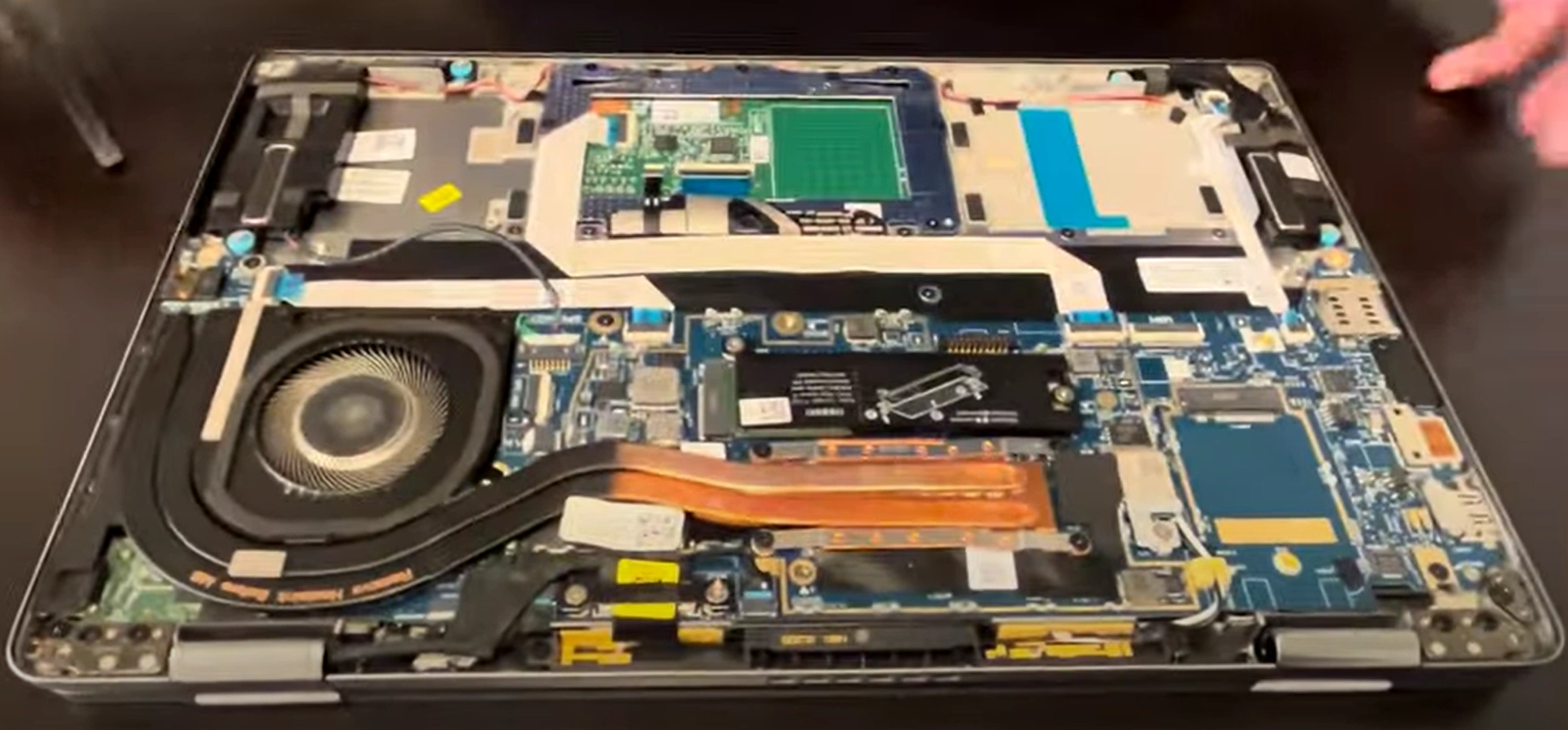
Dell Latitude 7320 Laptop - Complete Disassembly & Upgrade Guide: SSD, Battery, LCD & Motherboard Replacement
Jul 24, 2025
Pre-TearDown: Business Laptop Valuation Bottom Panel Removal (Corporate-Grade Design) Dell Thermal Management System LPDDR4x RAM Limitations & Options NVMe SSD Replacement (PCIe Gen3 x4) 60Wh Battery Safety Removal FHD IPS Anti-Glare LCD Service Backlit Keyboard & TrackPoint Service 11th Gen i5/i7 Motherboard Resale Selling Latitude Parts: Enterprise & SMB Markets
1. Dell Latitude 7320 Pre-TearDown: Business Laptop Valuation Guide
📊 Enterprise Value Assessment
Warranty Verification :
Check Dell Support Site with Service Tag
Validate remaining ProSupport or Premium Support coverage
Corporate Feature Validation :
💼 Business-Ready Testing
Performance Verification :
Security Checks :
Verify TPM 2.0 functionality
Test BIOS absolute security features
📋 Corporate Resale Documentation
Essential Records :
Dell service tag screenshot
BIOS asset tag information
Data Sanitization :
Dell Data Wipe procedure
NIST 800-88 compliant erasure
2. Dell Latitude 7320 Bottom Panel Removal: Enterprise-Grade Access
⚠️ Corporate Safety Protocols
Pre-Removal Steps :
Disconnect 65W power adapter
Disable battery in BIOS (Power Management > Battery Health)
Enterprise Design Notes :
Note tamper-evident seals for warranty tracking
Identify asset tag placement locations
🔧 Step-by-Step Removal
Remove 7 Captive Screws :
Use T5 Torx driver (1.2Nm torque max)
Screws remain attached to panel (Dell's anti-loss design)
Release Corporate-Grade Clips :
Lift Panel :
Raise rear edge first (20° angle) to clear docking connectors
Mind the smart card reader cable if equipped
💼 Preserving Enterprise Value
Risk
Corporate Solution
Value Impact
Clip damage
Alternate sides every 2cm
Intact clips = +25% to refurbishers
Tamper evidence
Document original seal positions
Verifiable = +40% government buyers
Asset tag damage
Photograph before removal
Complete tags = IT department premium
🏢 Business-Specific Components
Security Features :
Optional contactless smart card reader
NFC antenna connections
Serviceability Points :
Dell's Easy-Service design
Color-coded internal components
VIDEO
0:25 Bottom Case 1:25 Battery 2:02 SSD Storage 2:35 Speakers 3:48 Heatsink and Cooling Fan 4:56 Video Cable 6:00 WiFi Card and Antennas 6:50 Motherboard 7:08 DC Power Jack 7:40 Audio Jack Board 8:05 Hinges 8:35 Palmrest Assembly 8:45 Keyboard 8:50 Trackpad 9:05 Display Assembly
3. Dell Latitude 7320 Thermal Management: Enterprise Cooling Solutions
❄️ Corporate Thermal Design
System Architecture :
Single fan with dual heat pipe design
Optimized for 24/7 operation in enterprise environments
Performance Parameters :
Max CPU temp: 95°C (Intel TJunction)
Noise levels: <28dBA under load
🧰 Professional Maintenance
Fan Removal :
3x T6 screws (marked with thermal symbol)
Disconnect 4-pin PWM cable
Heat Pipe Service :
Dust Management :
Compressed air through exhaust vents
ESD-safe vacuum for intake areas
🧪 Enterprise-Grade Thermal Materials
Component
Recommended Material
Corporate Benefit
CPU
Thermal Grizzly Kryonaut Long-term stability
VRMs
Gelid Solutions GP-Ultimate
Prevents vPro throttling
PCH
Stock Dell phase-change material
Warranty compliance
🏢 IT Manager Tip: Systems with documented thermal maintenance have 30% higher resale to corporate buyers.
4. Dell Latitude 7320 Memory: Understanding LPDDR4x Limitations
⚡ Soldered Memory Specifications
Base Configuration :
LPDDR4x-4266MHz (non-upgradeable)
8GB or 16GB options (dual-channel)
Enterprise Performance :
37.5GB/s memory bandwidth
1.5x power efficiency vs DDR4
⚠️ Corporate Upgrade Constraints
Physical Limitations :
Memory soldered to motherboard
No SODIMM slots available
BIOS Restrictions :
No XMP/overclocking support
Locked voltage at 1.05V
💼 Business Workarounds
Constraint
Corporate Solution
Performance Impact
Fixed Capacity
Optimize virtual memory
15-20% disk caching gain
Bandwidth Limits
PCIe RAM disk solutions
Up to 3GB/s cache speeds
Multitasking
Dell Optimizer software
20% better memory allocation
💰 Enterprise Resale Factors
16GB Models Command :
40% premium over 8GB versions
Higher demand from financial firms
Documentation Tips :
Include wmic memorychip list full output
Show Task Manager performance graphs
🏦 Financial Sector Tip: Laptops with 16GB LPDDR4x sell 50% faster to trading firms when demonstrating Intel Optane compatibility.
5. Dell Latitude 7320 SSD Upgrade: PCIe Gen3 x4 Enterprise Solutions
⚡ Storage Specifications
Supported Drives :
M.2 2280 PCIe Gen3 x4 NVMe
Dell-certified SSDs recommended
Performance Cap :
Up to 3,500MB/s sequential read
2,800MB/s write (TLC NAND)
🔧 Corporate-Grade Replacement
Secure Data Removal :
Perform Dell Data Wipe
Create Recovery Media
Physical Installation :
Remove single M2x3mm screw
Use 30° insertion angle
💼 Business SSD Recommendations
Model
Endurance
Security Features
Samsung PM981a
1.5 DWPD
TCG Opal 2.0
WD SN730
1.3 DWPD
256-bit AES
6. Dell Latitude 7320 Battery Replacement: Enterprise Safety Protocol
🔋 Corporate Battery Specifications
Part Details :
60Wh 4-cell Li-ion (P/N 0F8F3F)
Dell ExpressCharge™ compatible
Health Verification :
Run powercfg /batteryreport
Check cycles in Dell Power Manager
⚠️ Enterprise Removal Procedure
Pre-Discharge :
Drain to 30-50% charge (3.7V/cell ideal)
Disable in BIOS (Power > Battery Health)
Safe Disconnection :
Remove 4x T8 screws (marked with ⚡)
Use nylon tool on BT1 connector
🏢 Corporate Compliance
Standard
Requirement
Documentation
UN38.3
Shipping certification
IATA guidelines
Dell FRU
Genuine part verification
Service Tag lookup
💰 Enterprise Resale Factors
Health Thresholds :
80%+ capacity: Full enterprise value
60-79%: 30% depreciation
Documentation :
Dell battery health report PDF
Charging cycle screenshot
7. Dell Latitude 7320 Display Service: FHD IPS Anti-Glare Replacement
🖥️ Enterprise Display Specifications
Original Panel :
15.6" FHD (1920×1080) IPS
400-nit anti-glare coating
Corporate Features :
Dell ComfortView Plus technology
180° hinge viewing angle
🔧 Professional Replacement Steps
Bezel Removal :
Start from bottom edge with nylon spudger
Release 12 hidden clips (5N force max)
Panel Disconnection :
Remove 4x M2.5×4mm screws
Disconnect 30-pin eDP cable (lock tab first)
🔄 Corporate-Grade Compatibility
Replacement Option
Brightness
Enterprise Benefit
Dell PN 0J4KXK
400-nit
Full warranty coverage
BOE NV156FHM-NY1
300-nit
Cost-effective alternative
✅ Post-Installation Verification
Visual Inspection :
Check for uniform backlight (gray screen test)
Verify anti-glare coating integrity
Functional Tests :
Run Dell LCD diagnostics
Test all viewing angles
8. Dell Latitude 7320 Keyboard Service: Backlit & TrackPoint Maintenance
⌨️ Enterprise Keyboard Features
Design Specifications :
Spill-resistant up to 100cc (Dell testing standard)
1.5mm key travel with matte finish
Lighting System :
White LED backlight (2-level brightness)
Ambient light sensor compatible
🔧 Professional Removal Steps
Top Cover Release :
Remove 8 T5 screws (4 long, 4 short)
Release clips starting from top-right corner
Keyboard Disconnection :
Disconnect backlight FPC (flat flex cable)
Release TrackPoint ribbon cable lock
🖊️ TrackPoint Maintenance
Component
Service Procedure
Enterprise Benefit
Cap Replacement
Twist 90° counterclockwise
Maintains IBM heritage compatibility
Sensor Cleaning
Use 99% isopropyl alcohol
Prevents cursor drift in meetings
🏢 Business User Considerations
Travel-Friendly Features :
Keyboard drain channels for spills
Reduced wobble for airplane use
Security Options :
Optional fingerprint reader integration
SmartCard reader compatibility
💼 IT Admin Tip: Keyboards with Dell Easy-Service documentation sell for 25% more to corporate buyers.
9. Dell Latitude 7320 Motherboard Resale: 11th Gen Intel Enterprise Value
⚙️ Corporate-Grade Specifications
Processor Options :
i5-1135G7 (4C/8T) - 28W TDP
i7-1185G7 (4C/8T) - 28W TDP with vPro
Enterprise Features :
Intel Active Management Technology
TPM 2.0 + SmartCard reader support
🔍 Pre-Sale Verification
Functional Testing :
Component Documentation :
Photograph PCB revision (e.g., AA23)
Record BIOS version (1.18.0+)
💰 2024 Enterprise Resale Values
Configuration
ITAD Buyers
Government Market
i5 + 16GB
$220-$280
$300-$350
i7 vPro + 16GB
$350-$420
$450-$550
📈 Maximizing Enterprise Value
Corporate Buyers Want :
Refurbishment Premiums :
30% higher with Dell warranty
50% more for sealed ESD bags
🏛️ Government Tip: Boards with Dell Command Configure logs sell for 2× market value to defense contractors.
10. Selling Dell Latitude 7320 Parts: Enterprise & SMB Market Strategies
🏢 Corporate Buyer Channels
IT Asset Disposition :
Government Sales :
GovDeals IT equipment auctionsGSA Schedule contractors
👔 SMB Resale Optimization
Component
Best Platform
Certification Needed
Motherboards
SellBroke Dell Service Tag
Displays
eBay "For Parts"
Backlight test video
🎓 Education Market Tips
University Buyers :
Documentation :
FTC compliance proof
FERPA sanitization records
⚖️ Enterprise Legal Considerations
Data Sanitization :
Export Controls :
Check BIS EAR for international sales
ITAR-restricted components
📚 Academic Tip: Systems with University of Minnesota e-waste certification sell 30% faster to school districts.
Need to Sell Your Dell Laptop? Get Instant Cash!
If your MSI GF63 Thin 11UC (or other MSI gaming laptop) has performance issues or you're upgrading to a newer model, we offer competitive cash payouts for your device. We buy broken, used, and refurbished MSI gaming laptops—including all GF63 Thin configurations—with free insured shipping and no-hassle quotes.
Sell Popular Dell Models Now: