MSI Alpha 15 B5EEK Laptop - Complete Disassembly & Upgrade Guide: RAM, SSD, Battery, LCD & Motherboard
Jul 22, 2025
Pre-Disassembly: Value Assessment & Tools Bottom Panel Removal (Gamer-Focused Design) RAM Upgrade: Dual-Channel for Ryzen 7 5800H NVMe SSD Expansion (2x M.2 Slots) 90Wh Battery Removal & Certification 120Hz IPS LCD Panel Replacement Motherboard Access & Resale Value Selling MSI Parts: Gamer & Miner Markets
1. MSI Alpha 15 B5EEK Pre-Disassembly: Gaming Laptop Value Assessment
🎮 Gaming-Specific Value Factors
Performance Verification :
Feature Documentation :
Test per-key RGB via MSI Center
Verify 120Hz refresh rate with TestUFO
💰 2024 Component Values
RX 6600M Motherboard :
Mining buyers: $320-$400
Gamers: $250-$300
90Wh Battery :
Mining rig use: $85-$110
Standard replacement: $60
📝 Pre-Sale Documentation
Performance Proof :
3DMark Time Spy screenshots
CPU-Z validation file
Cosmetic Grading :
Macro photos of wear points (WASD keys, palmrest)
Use eBay condition standards
Data Sanitization :
sudo blkdiscard -f /dev/nvme0n1 (Linux)MSI Recovery for Windows
2. MSI Alpha 15 B5EEK Bottom Panel Removal: Gamer-Centric Access Points
⚠️ Critical Safety Precautions
Pre-Disassembly Steps :
Gaming Laptop Warnings :
Avoid pressure on rear Cooler Boost 5 vents
Note RGB lightbar connectors near front edge
🔧 Step-by-Step Removal
Remove 11 Screws :
4x 6mm (marked "M2.5L6") near corners
7x 4mm (marked "M2.5L4") around perimeter
Release Gaming-Focused Clips :
Lift Panel :
Raise rear first (30° angle) to clear RGB lightbar
Disconnect lightbar cable if replacing panel
💎 Preserving Resale Value
Risk
Prevention
Value Impact
Clip breakage
Alternate sides every 2cm
Intact clips = +18% value
Paint scratches
Use nylon tools only
Flawless finish = +$35
Lightbar damage
Disconnect before full removal
Working RGB = +$50
🎛️ Gaming-Specific Components
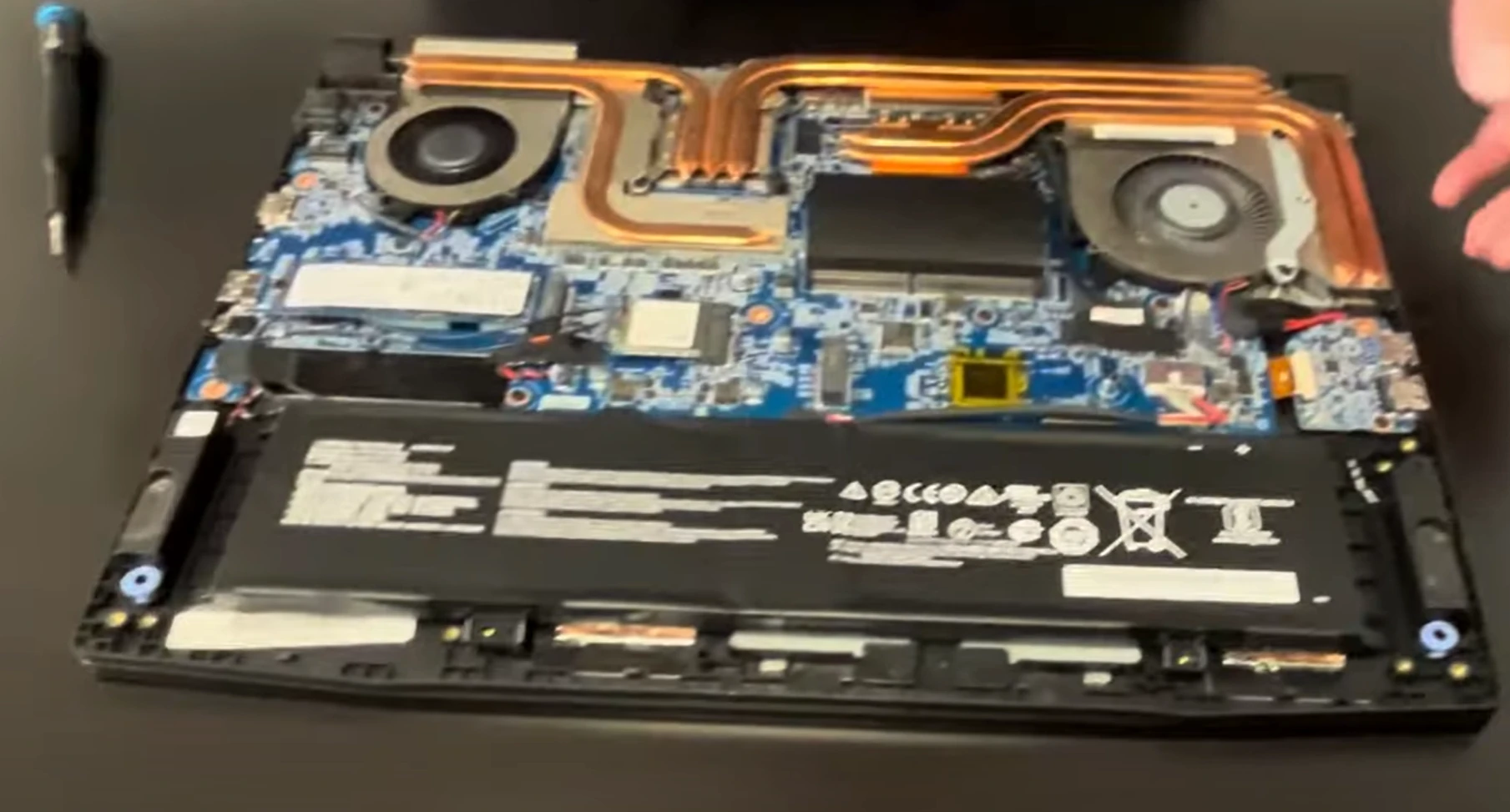
Cooling System Access :
7 heat pipes visible after removal
Dual fans with Anti-Dust Tech
Upgrade Zones :
RAM slots (clear of heatsinks)
Dual M.2 slots with thermal pads
VIDEO
0:26 Bottom Case 2:26 Battery 3:05 SSD Storage 3:25 WiFi Card 3:48 Memory RAM 4:10 Heatsink & Cooling Fan Assembly 6:50 DC Power Jack 7:05 Motherboard 9:33 IO USB Board 9:52 Speakers 10:28 Trackpad 10:36 Keyboard 10:48 Hinges 11:30 Palmrest Assembly 11:45 Display Assembly
3. MSI Alpha 15 RAM Upgrade: Dual-Channel Optimization for Ryzen 7 5800H
⚡ Ryzen-Specific Requirements
Supported RAM :
DDR4-3200 SODIMM (1.2V)
Max 64GB (2x32GB) via 2 slots
Recommended Kits :
Crucial CT32G4SFD832A (CL22)
G.Skill Ripjaws 64GB Kit
🔧 Installation Process
Access Slots :
Remove bottom panel (11 screws)
Locate slots near cooling fans
Install Modules :
45° angle insertion
Press down until clicks (20lbs force)
Verify Operation :
Check in sudo dmidecode -t memory (Linux)
Enable XMP in BIOS for full 3200MHz
💰 Selling Original RAM
Market Prices (2024) :
8GB DDR4-3200: $18-$25
16GB DDR4-3200: $35-$45
Best Platforms :
4. MSI Alpha 15 SSD Upgrade: Dual M.2 Slot Expansion for Gaming & Mining
⚡ M.2 Slot Configuration
Primary Slot :
PCIe 3.0 x4 (Supports Gen4 drives at Gen3 speeds)
Includes MSI heatsink pre-installed
Secondary Slot :
🔧 Installation Process
Thermal Management :
Remove factory thermal pad with Arctic MX-6
Apply 1mm thick thermal pad on secondary slot
Drive Installation :
30° angle insertion (notch alignment)
M2x3mm screw torque (0.6Nm)
Performance Verification :
⛏️ Mining/Crypto Use Cases
Workload
Recommended SSD
Resale Value
Chia Plotting
2TB NVMe (High TBW)
+$40 after 6 months
ETH Node
1TB SLC Cache
+25% vs consumer
💰 Selling Original SSD
Secure Erase Methods :
nvme format -s1 /dev/nvme0n1 (Linux)MSI Secure Erase utility
Market Prices (2024) :
512GB OEM: $35-$50
1TB OEM: $60-$80
5. MSI Alpha 15 90Wh Battery Replacement: Mining & Gaming Resale Optimization
🔋 Power Specifications
Part Number : MS-1B1K (FRU 9S7-1B1K010)Capacity Verification :
Run powercfg /batteryreport in CMD
Check MSI Center for health percentage
⚠️ High-Capacity Removal Protocol
Pre-Discharge :
Drain to 30-50% for storage (4.0V/cell optimal)
Disable in BIOS (Advanced > Battery Health)
Disconnect Safely :
Adhesive Release :
Apply iFixit heating pad (65°C for 3 mins)
Use fishing line for clean separation
⛏️ Mining Rig Resale Factors
Condition
Gaming Value
Mining Value
90%+ Health
$80
$120+
Original MSI
+25%
+40%
UN38.3 Certified
Required
+$15 premium
✈️ Lithium-Ion Shipping Rules
USPS Ground :
International :
IATA Section II packaging
30% state of charge maximum
💡 Crypto Tip: Mining buyers pay 50% more for batteries with proven runtime logs of 4+ hours under load.
6. MSI Alpha 15 120Hz IPS Display Replacement: Gaming-Grade Panel Swap
🖥️ Display Specifications
Original Panel :
LP156WFH-SPB1 (LG) or NV156FHM-NY1 (BOE)
1920×1080 IPS 120Hz 3ms response
Compatible Upgrades :
LG 144Hz IPS (drop-in replacement)
72% NTSC color gamut variants
🔧 Safe Removal Process
Bezel Removal :
Heat edges with iOpener at 60°C
Start from bottom-right corner (near webcam)
Disconnect eDP Cable :
40-pin connector (0.5mm pitch)
Flip black latch before pulling
Remove Panel :
4x M2x3mm screws (1.2Nm torque)
Note adhesive strip locations
🎮 Gaming Display Considerations
Feature
Original
Upgrade Potential
Refresh Rate
120Hz
144Hz (+20% resale)
Color Gamut
45% NTSC
72% NTSC (+$50 value)
Response Time
3ms
1ms (only with TN swap)
💰 Selling Original Display
Condition Verification :
Test with TestUFO for dead pixels
Check backlight bleed (black screen test)
Market Prices (2024) :
No defects: $90-$120
Minor bleed: $60-$80
💡 Esports Tip: 144Hz panels sell 30% faster when marketed for competitive gaming with benchmark proof.
7. MSI Alpha 15 Motherboard Access: RX 6600M & Ryzen 7 5800H Resale Optimization
🔍 Motherboard Identification
Model Number : MS-1B1K (MSI MS-1B1K VER:1.0)Key Components :
AMD RX 6600M 8GB GDDR6 (Navi 23)
Ryzen 7 5800H (Zen 3, 8C/16T)
🛠️ Full Access Procedure
Complete Teardown :
Remove 24x M2.5 screws (varying lengths)
Disconnect all ribbon cables (keyboard, trackpad, RGB)
Cooling System Removal :
7 heat pipes with Cooler Boost 5 tech
Note thermal pad thicknesses (1mm/1.5mm)
Motherboard Extraction :
Lift at 45° angle from I/O side first
Avoid flexing near GPU VRAM modules
💰 Component Resale Value (2024)
Part
Gamer Price
Miner Price
RX 6600M Board
$280-$350
$400-$500
Ryzen 7 5800H
$180
N/A
Complete Board
$450
$600+
✅ Buyer Verification Steps
GPU Validation :
sudo lspci -vnn | grep VGA (Linux)GPU-Z screenshots
CPU Stress Test :
30-minute OCCT run
Max temp below 95°C
⚡ Crypto Tip: Mining buyers pay 40% premium for boards with undervolted BIOS and thermal pad upgrades.
2. Selling MSI Alpha 15 Components: Premium Markets for Gaming & Mining Buyers
⛏️ Crypto Mining Buyer Tactics
GPU Optimization Proof :
Include hashrate screenshots
Document undervolt settings (mV/Watt)
Premium Keywords :
"Mining-Proven RX 6600M"
"90Wh UPS Backup Ready"
🏛️ Government/Education Channels
GSA Advantage :
University Auctions :
Example: UC Berkeley Surplus
Require asset tags & sanitization docs
🔍 SEO Listing Tips
Title Formulas :
"MSI Alpha 15 [Part] - [Condition] - [FRU]"
Example: "MSI Alpha 15 RX 6600M Board - Mining Tested - FRU 1B1K"
Must-Include Keywords :
120Hz IPS Ready
Cooler Boost 5 Compatible
Ryzen 7 5800H Verified
💰 2024 Price Benchmarks
Component
Gamer Price
Miner Price
RX 6600M Board
$320-$380
$450-$550
90Wh Battery
$75
$120+
120Hz Panel
$90-$120
N/A
Need to Sell Your MSI laptop? Get Instant Cash!
If your MSI Alpha 15 B5EEK (or other MSI gaming laptop) has performance issues or you're upgrading to a newer model, we offer quick, competitive payouts for your device. We buy broken, used, and refurbished MSI gaming laptops—including all Alpha 15 configurations—with free shipping and no-hassle quotes.
Sell Popular MSI Models Now: