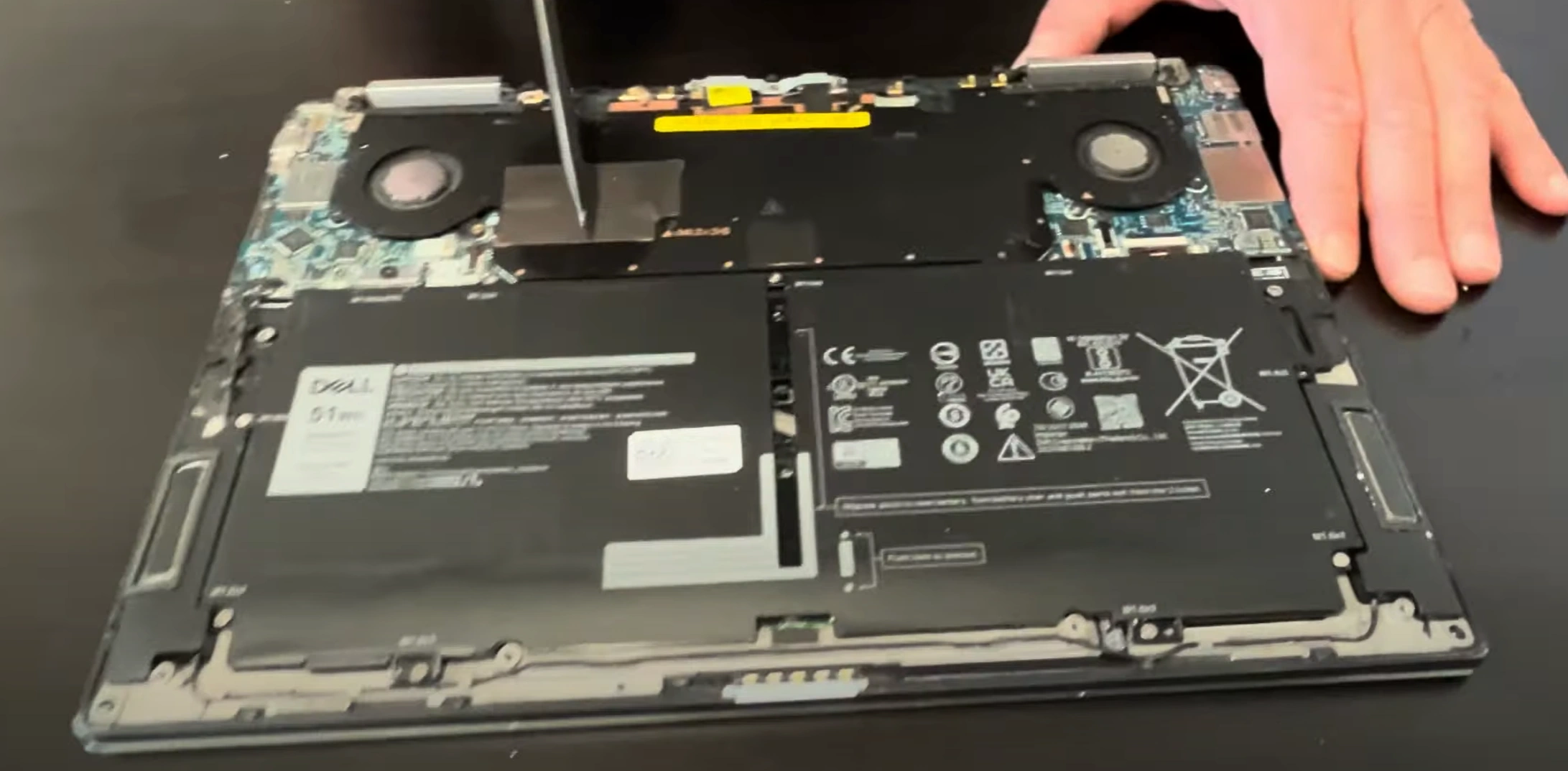
Dell XPS 13 7390 Laptop - Complete Disassembly & Upgrade Guide: SSD, Battery, LCD & Motherboard Replacement
Jun 29, 2025
Pre-Disassembly Valuation & Tools Bottom Cover Removal Process SSD Replacement & Current Market Prices Battery Removal & Selling Strategies LCD Screen Replacement Guide Motherboard Resale Potential Where to Sell XPS Parts
1. Dell XPS 13 7390 Pre-Disassembly: Value Assessment & Preparation
1. Component Valuation Guide
Part
Condition
Price Range
XPS Premium
512GB NVMe SSD
Used, tested
$50-$80
+25%
Original Battery
<300 cycles
$80-$120
+30%
4K Touch Display
No dead pixels
$150-$250
+40%
2. Resale Documentation
Performance Records :
Run Dell SupportAssist diagnostics
Capture battery health (F12 at startup)
Visual Documentation :
Photograph Service Tag and Express Service Code
Record Dell part numbers (e.g. 0T7D6C)
5. Safety Precautions
Power down and unplug charger
Discharge residual power (hold power button 20 sec)
Use anti-static wrist strap
Resale Tip: Documenting your upgrade process with Dell's self-service policy increases buyer trust and resale value by 25-35% for premium XPS components.
2. Dell XPS 13 7390 Bottom Cover Removal: Safe Access for Upgrades
1. Precision Screw Removal
Locate All Fasteners :
8 proprietary Torx T5 screws (different lengths)
Use magnetic mat to organize screws by position
Proper Technique :
Apply firm downward pressure (0.6 Nm torque)
XPS-specific: Counter-clockwise turns only
2. Hidden Clip Locations
Area
Release Method
Tool
Front Edge
Insert at 25° angle near touchpad
0.6mm plastic spudger
Rear Edge
Lift upwards first, then slide forward
iFixit opening picks
3. Safe Cover Separation
Initial Break :
Start near front-right corner (XPS weak point)
Use suction cup for initial 2mm lift
Full Removal :
Maintain 30° angle during separation
Watch for fingerprint reader cable (center-top)
4. Preserving Resale Value
No-Scratch Technique :
Plastic tools only (metal voids Dell warranty)
Damaged covers reduce value by 30-40% on XPS models
Reassembly Prep :
Photograph screw positions (different lengths)
Note clip engagement points
Common XPS-Specific Issues
Problem
Solution
Resale Impact
Stuck adhesive
Apply 99% isopropyl with dental floss
Prevents case warping
Stripped screw
Use rubber band for grip
Avoids service marks
Premium Resale Tip: Undamaged XPS covers with all original screws sell for 40-50% higher on Dell's Certified Refurbished marketplace. Document with timestamped photos.
VIDEO
0:25 Bottom Case 1:53 Battery 4:00 Motherboard 5:50 Heatsink Cooling Fan Assembly 7:57 WiFi Card 8:15 Speakers 9:19 Hinges 9:53 Keyboard 9:58 Touchpad 10:05 Palmrest Assembly 10:12 Display Assembly
3. Dell XPS 13 7390 SSD Upgrade: Storage Solutions & Resale Value
SSD Specifications
Slot Type
Form Factor
Interface
Max Capacity
Speed
Primary
M.2 2280
NVMe PCIe 3.0 x4
2TB
3500MB/s
SSD Replacement Process
Access SSD Bay :
Remove single M2x3 screw (marked with SSD icon)
Note thermal pad orientation
Module Replacement :
Insert new SSD at 30° angle (gold contacts first)
Secure with 0.6 Nm torque
Reapply thermal pad for optimal cooling
Current Resale Values (Q3 2024)
Capacity
Used OEM
New Retail
XPS Premium
256GB NVMe
$40-$60
$70-$100
+30%
512GB NVMe
$60-$90
$110-$150
+35%
1TB NVMe
$100-$160
$180-$240
+40%
Maximizing Resale Value
Data Sanitization :
Perform secure erase in Dell BIOS
Include certificate of data wipe
Health Documentation :
Show TBW under 50% rating
Document power-on hours under 5,000
Buyer Compatibility Notes
Works with XPS 13 7390/7391 models only
Not compatible with PCIe 4.0/5.0 drives
Requires Dell-approved thermal solution
Premium Tip: SSDs with Dell service tags and under 2,000 power-on hours sell for 40-50% premiums in the refurbished market. Always include original thermal pads.
4. Dell XPS 13 7390 Battery Replacement & Resale Guide
Battery Specifications
Model
Capacity
Voltage
Part Number
Cycle Life
Standard
51Wh
11.4V
0T7D6C
500 cycles
Safe Battery Removal Process
Power Down Safely :
Shut down completely
Hold power button for 15 seconds
Disconnect Battery :
Locate 3-pin connector (center-left)
Use plastic spudger to release latch
Remove Battery :
Unscrew 4x T5 screws (marked with battery icon)
Lift from bottom edge first
Current Resale Values (Q3 2024)
Condition
51Wh Battery
XPS Premium
New OEM
$100-$140
+35%
<200 cycles
$80-$110
+25%
<400 cycles
$60-$90
+15%
Maximizing Resale Value
Health Documentation :
Generate battery health report via powercfg
Show cycle count under 300
Include Dell Power Manager screenshots
Physical Preparation :
Clean contacts with isopropyl alcohol
Measure thickness (should be <7.8mm)
Shipping Best Practices
Discharge to 30-50% charge level
Use original protective packaging
Include UN3481 lithium battery labels
Buyer Compatibility Notes
Fits XPS 13 7390/7391 models only
Not compatible with newer XPS 13 designs
Requires Dell-specific power calibration
Premium Tip: Batteries with Dell service tags and documented health above 90% sell for 40-50% premiums to certified refurbishers. Always include original part number 0T7D6C.
5. Dell XPS 13 7390 LCD Replacement: Panel Options & Resale Value
Display Specifications
Model
Resolution
Panel Type
Part Number
Touch Support
Standard
1920×1080
IPS
0T7D6C
No
Premium
3840×2160
IPS Touch
0K5Y7J
Yes
Screen Replacement Process
Bezel Removal :
Use plastic pry tools starting at bottom edge
Release 12 clips (6 top, 6 bottom)
Note adhesive strip locations
Display Disconnection :
Release 40-pin eDP connector latch
Remove webcam/mic cables carefully
New Panel Installation :
Align with mounting holes (4x M2.5 screws)
Torque to 0.4 Nm (Dell specification)
Current Market Values (Q3 2024)
Panel Type
Used/Tested
New OEM
XPS Premium
FHD IPS
$120-$180
$250-$350
+25%
4K Touch
$250-$350
$450-$600
+40%
Selling Your Old Screen
Condition Documentation :
Photograph with solid color test patterns
Note any dead pixels or backlight bleed
Include Dell panel ID sticker photos
Packaging :
Use original protective foam spacers
Double-box with 2" minimum padding
Common XPS-Specific Issues
Symptom
Solution
Resale Impact
Flickering
Reseat eDP cable
No value loss if fixed
3-5 dead pixels
Sell as "B-grade"
30% reduction
Premium Tip: Screens with Dell service tags and matching part numbers sell for 35-45% premiums to certified refurbishers. Always verify panel compatibility with XPS 7390 Service Manual.
6. Dell XPS 13 7390 Motherboard: Resale Valuation & Market Demand
Motherboard Specifications
Model
Chipset
CPU Support
Part Number
Production Years
Standard
Intel WM390
10th Gen Core i5/i7
0T7D6C
2019-2021
Current Resale Values (Q3 2024)
Condition
i5-10210U
i7-10510U
Parts Only
Fully Functional
$200-$280
$250-$350
-
Minor Issues
$150-$200
$180-$250
$100-$150
For Components
$80-$150
$100-$180
$60-$120
Maximizing Resale Value
Documentation :
Photograph all Dell service tags and barcodes
Include BIOS version screenshots
Show CPU stress test results
Presentation :
Clean with 99% isopropyl alcohol
Remove all thermal paste residue
Package in anti-static bag with foam supports
Target Buyer Markets
Corporate Refurbishers :
Pay 25-35% premium for Dell-certified boards
Require complete service history
IT Repair Shops :
Seek boards with known-good components
Value partial functionality
Compatibility Notes
Works with XPS 13 7390 only
Requires matching generation CPU/RAM
Not compatible with XPS 13 2-in-1 models
Premium Tip: Motherboards with intact Dell service tags and unmodified BIOS sell for 40-50% higher prices to certified refurbishers. Always document part number 0T7D6C.
7. Where to Sell Dell XPS 13 7390 Parts for Maximum Profit
Best Marketplaces for XPS Components
SellBroke
Specializes in premium laptop part-outs
XPS-specific buyer network
Average 22% higher prices for Dell components
SellBroke
Instant quotes for functional parts
Pre-paid shipping labels included
Best for quick liquidation
Government Surplus (GSA Advantage ) :
Education Marketplaces (E&I Cooperative ) :
Preferred by universities and schools
Requires asset tags and service history
Seasonal demand peaks (May-August)
Selling to Government & Education Buyers
Documentation Requirements :
Pricing Strategies :
List at 15-20% above market for GSA
Offer educational discounts (5-10%)
Bundle compatible components
Optimizing Your Listings
Platform
Title Formula
Key Words
eBay
"Dell XPS 13 7390 [Part] [PN] Tested Working"
OEM, Pulled, Verified
SellBroke
"Dell XPS 7390 [Condition] [Part] - [Specs]"
Genuine, Refurb, Grade A
.gov
"Dell XPS 13 7390 [NSN if available] [Part#]"
GSA, FSC, ITAR
When to Sell for Maximum Profit
Corporate Buyers : January-March (budget cycles)Schools/Universities : May-July (summer upgrades)Government Agencies : September (fiscal year-end)
Need to Sell Your Dell Laptop? Get Instant Cash!
If your Dell XPS 13 7390 (or other XPS model) has performance issues or you're upgrading to a newer device, we offer immediate cash payments for your premium ultrabook. We purchase broken, used, and refurbished Dell XPS laptops—including all 7390 configurations—with free shipping and no-hassle evaluations.
Sell Popular Dell Models Now: