Dell Precision 3490 Very Easy Battery Replacement & RAM Upgrade: Sell Laptop Fast Cash
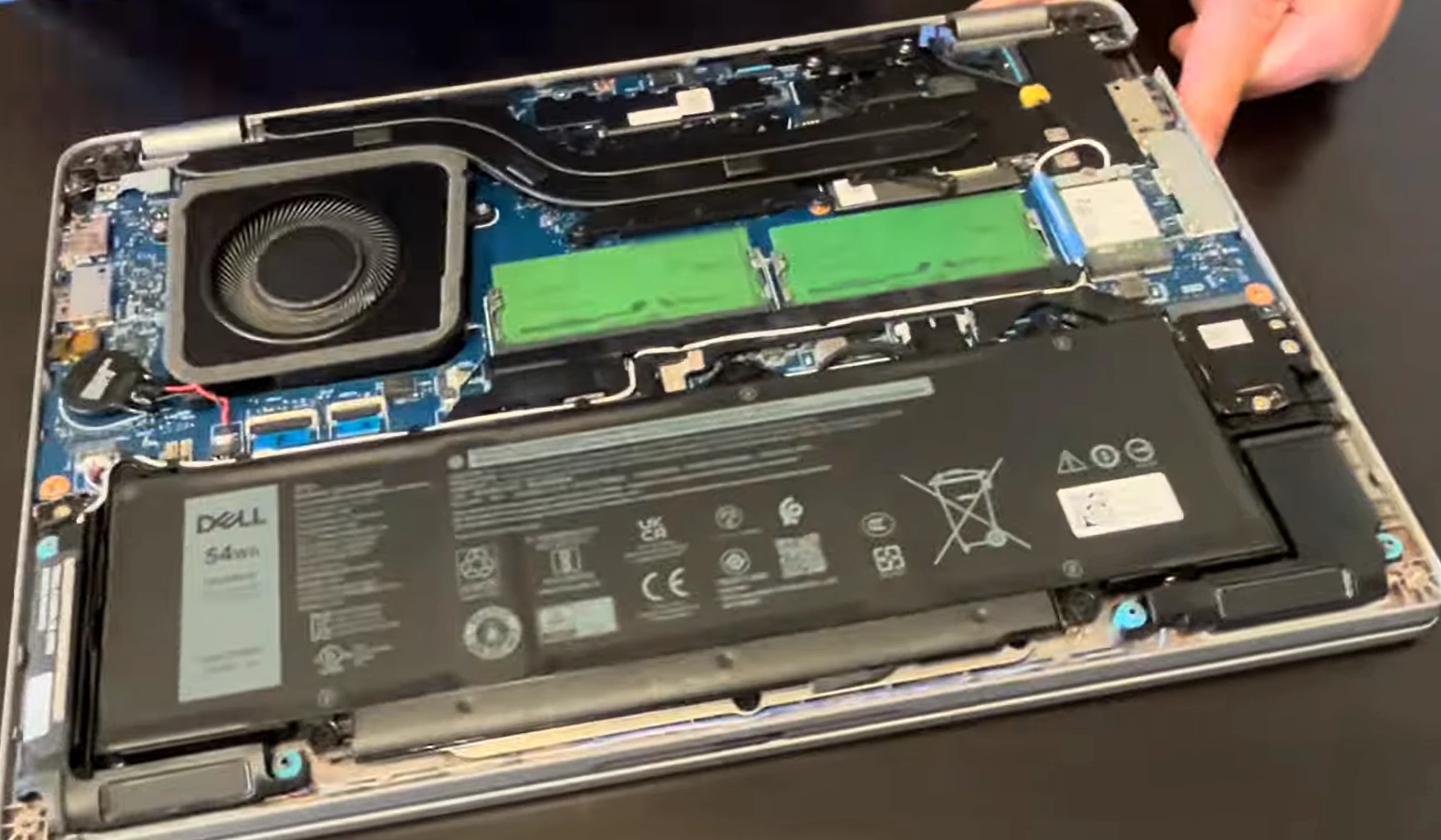
Want to ** sell laptop fast cash**, **get cash for used laptop**, or **trade in laptop** for something newer? The Dell Precision 3490 (14" compact workstation with Intel Core Ultra 5/7, NVIDIA RTX A500 optional) has user-replaceable battery and upgradable RAM – two quick DIY upgrades that dramatically increase resale value and battery life. Perfect for fast online sales or trade-ins!
This guide shows simple battery swap + RAM upgrade steps and tips to maximize your cash offers or trade value.
Why Replace Battery & Upgrade RAM Before Selling Your Precision 3490?
- New battery = 8–10+ hours runtime vs. worn one – huge buyer priority
- RAM upgrade to 64GB → handles heavy CAD/rendering workloads smoothly
- These easy fixes add 30–70% value – ideal for **sell laptop fast cash** or **trade in laptop**
- Beginner-friendly (basic tools, 15–30 min) → low cost, high profit
Video Tutorial: Battery Replacement & RAM Upgrade
Watch this clear YouTube guide showing very easy battery replacement and RAM upgrade on Dell Precision 3490 – step-by-step teardown and reassembly!
0:25 Unscrews bottom screws 0:57 Pull off bottom case 1:31 Check battery type 1:14 Unplug old battery 1:48 Unscrew and take out old battery 2:13 Install new battery 2:20 Take out RAM Memory 2:44 Install new bigger RAM 2:55 Install bottom case back on
Key Upgrade & Repair Options – Dell Precision 3490
- Battery: Replaceable internal pack (e.g., 54Wh or 64Wh variants) – buy OEM/compatible from Dell/Amazon/iFixit
- RAM: 2× SODIMM slots – upgrade to max 64GB DDR5-5600MHz (dual-channel for best performance)
- Tools needed: Phillips screwdriver, plastic pry tool, anti-static wrist strap (optional)
- Access: Remove bottom cover screws → disconnect battery → swap RAM/battery
- Bonus: Clean fan/heatsink while open → improves cooling & longevity
Quick Battery Replacement & RAM Upgrade Steps
- Power off, unplug, discharge battery if possible
- Remove bottom cover screws (usually 8–10 Phillips)
- Gently pry off bottom cover (start from edges)
- Disconnect battery cable from motherboard (pull tab/connector)
- Remove screws holding battery → lift out old battery
- Insert new battery, secure screws, reconnect cable
- Upgrade RAM: Insert new DDR5 modules at 45° → press until clips lock
- Reassemble, power on, calibrate battery (full charge/discharge cycle) – ready to **sell laptop fast cash**!
Quick Cash for Laptop – Upgraded Dell Precision 3490
List it highlighted: "New Battery + 32GB/64GB RAM Upgraded – Compact Pro Workstation Excellent Condition!" Attracts buyers fast on OLX, Facebook Marketplace, or buyback sites.
Use terms like "**quick cash for laptop** Dell Precision 3490 upgraded", "**sell laptop fast cash** with new battery" or "** trade in laptop**" – expect much better offers!
Good luck with your quick DIY upgrades and profitable sale! 💻🔋
Sell Popular Dell Laptop Models Now: